
Participant
August 6, 2018
Answered

Can't update books

  • August 6, 2018
  • 1 reply
  • 1429 views

I am not able to update existing books. This includes books that I have previously been able to update (meaning that I don't think it's a corruption of one book file). When I attempt to do updates or book-level application of show/hide conditional text, the application crashes without any meaningful error message, just "Adobe FrameMaker 2015 has stopped working" (screenshot below).
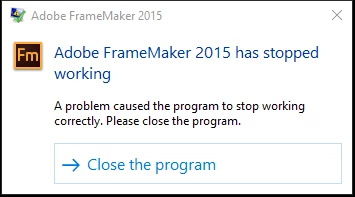
System info: Windows 10, 64-bit

FM version: 13.0.5.547

Stuff I've tried (to no avail):

  • Opening and updating an older book (that I know I was able to update and publish to PDF within the last two weeks)
  • Opening all docs/chapters within the book before updating the book
  • Moving the book and docs from C drive to another (local) drive
  • Moving the book and docs to a network drive
  • Creating a new book and adding docs/chapters into the book one by one
  • Saving each file to MIF and then opening them to rebuild the book
  • Restarting my machine
  • Showing all conditional text
  • Copy and pasting text into entirely new docs/chapter files

I was able to create a new book from the prefab templates, add two paragraph markers and then create a TOC (that I could update). But I cannot update TOCs for or generate any PDFs from any of my existing work.

I am at my wits' end. Does anyone have any suggestions?

This topic has been closed for replies.
Correct answer Matt-Tech Comm Tools

These are what I'd do in that situation, in order:

  1. ensure you have latest Fm 2015 release (I believe it should begin with 13.0.5)
  2. Rename prefs folder (least effort, least destructive possibility http://techcommtools.com/find-framemaker-preference-folder/ )
  3. Delete TOC and Index references in book and relocate actual files from directory. Add back in from scratch.
  4. Download trial of 2017, update to latest patch, upgrade copy of project to see if it processes.

Good luck, and let us know how you fare.

-Matt

1 reply

Matt-Tech Comm Tools
Community Expert
Matt-Tech Comm ToolsCommunity ExpertCorrect answer
Community Expert
August 6, 2018

These are what I'd do in that situation, in order:

  1. ensure you have latest Fm 2015 release (I believe it should begin with 13.0.5)
  2. Rename prefs folder (least effort, least destructive possibility http://techcommtools.com/find-framemaker-preference-folder/ )
  3. Delete TOC and Index references in book and relocate actual files from directory. Add back in from scratch.
  4. Download trial of 2017, update to latest patch, upgrade copy of project to see if it processes.

Good luck, and let us know how you fare.

-Matt

-Matt Sullivan, FrameMaker Course Creator, Author, Trainer, Consultant
Participant
August 7, 2018

I can't believe it, but renaming the prefs folder worked! I am so relieved and thankful for your reply!

Matt-Tech Comm Tools
Community Expert
Community Expert
August 7, 2018

You never know...that's why I put it high on the list.

Glad you're back on track!

-Matt

-Matt Sullivan, FrameMaker Course Creator, Author, Trainer, Consultant