
Inspiring
December 4, 2020
Answered

Cannot access color to rename or modify in FrameMaker

  • December 4, 2020
  • 5 replies
  • 1228 views

Hello, 

I would like to be able to modify and rename one of my custom colors but when I go to the Color Definitions dialog and open the drop-down, it seems to be broken. My color is way down the list but apparently there's no way to access it.

Here's what the bottom of the Color Definitions drop-down looks like:
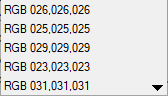
When I click on the down arrow you would think that the list would scroll but no dice - the color next to the arrow is chosen. I can't find any way to access my custom color to modify it.

Any suggestions?


thanks,

Elo

This topic has been closed for replies.
Correct answer lorib52691051

DOH! Update #2: I thought that the small arrow would scroll the list but just figured out that the arrow does nothing; I have to hold down on the last list item and then move my cursor below the list to scroll. Not intuitive in my opinion. Bottom line, I can now scroll down past the RGB definitions to edit my new color defs.

5 replies

Jeff_Coatsworth
Community Expert
Community Expert
December 4, 2020

Should, but it will be a separate install of FM - you can run multiple versions on one machine.

Inspiring
December 5, 2020

UPDATE: the bug still exists in FrameMaker 2020 😞

lorib52691051AuthorCorrect answer
Inspiring
December 5, 2020

DOH! Update #2: I thought that the small arrow would scroll the list but just figured out that the arrow does nothing; I have to hold down on the last list item and then move my cursor below the list to scroll. Not intuitive in my opinion. Bottom line, I can now scroll down past the RGB definitions to edit my new color defs.

Jeff_Coatsworth
Community Expert
Community Expert
December 4, 2020

Back in FM2019? Don't hold your breath - FM's now onto version 2020.

Inspiring
December 4, 2020

Hi Jeff, yeah that makes sense. I thought my subscription would let me update me to the latest version - is that not the case?


Lori

LinSims
Community Expert
Community Expert
December 4, 2020

If you have a subscription you can upgrade, but you actually have to go to the trial download page for FrameMaker (https://www.adobe.com/products/framemaker/download-trial/try.html), fill out the information for a trial, and then download the installation file. It's stupid, but it's the only way to get the upgrade. As long as you have an active subscription, it will automatically register.


Note that FM2020 is now subscription ONLY, so if you stop paying the subscription FM2020 will stop working. I would advise you to keep FM2019 around on the just in case principle. FM2019 will not open FM2020 binaries, but if you save everything to MIF you can open in FM2019.


Do not try to download from your My plans page from your account.adobe.com page. The download link takes you to the Creative Cloud downloads page. They've known about this for more than a year and still haven't fixed the link.

frameexpert
Community Expert
Community Expert
December 4, 2020

One possible workaround: create a new, blank document and create a color in that document with the same exact name and use the desired specifications for the color. Save the document and leave it open. Go to the target document and choose File > Import > Formats and import the Color Definitions from the other document.

Inspiring
December 4, 2020

Thanks, I'll give that a try.

Do you happen to know when the Color Definitions scrolling bug will be fixed?


Lori

Klaus Göbel
Legend
December 4, 2020

What version of FrameMaker do you use?

There was a bug in an older FrameMaker (2017 or 2019).

Make sure, that you have installed the latest version.

Then you can access the whole list again.


These RGB color are created in FrameMaker, when you copy and paste text from older Word versions.


Inspiring
December 4, 2020

Thanks Klaus,

I updated to version 15.0.6.956 and the pull-down still doesn't work (see my reply to Bob above). I inherited a pile of very old FrameMaker docs so not sure where the content originally came from. 


Lori

Bob_Niland
Community Expert
Community Expert
December 4, 2020

It looks like there are two problems here, and anyone who can address the Adobe side of it is going to need to know what version and point release of FM you are on.

  1. possible FM bug: no continuation nav for long catalog dialog
  2. that endless list of RGB colors is something I've seen before - I used to get that if I imported certain types of objects - I dimily recall DXF and DWG being particular problems. You can't even delete those RGBs while the object is still imported. I worked around it by converting the objects to other formats, usually EPS, but PDF would be worth a try too.
Inspiring
December 4, 2020

Thanks Bob,

I have FrameMaker 2019 Version: 15.0.5.838.

I checked images and they are all .gif or .jpg.

Drop-down still doesn't work so I tried deleting the RGB colors; the confirmation popup came up, I said OK and the color was not deleted.


Lori

Inspiring
December 4, 2020

One more note that may be relevant: the two new colors that I added are RGB.