
erlingn73238727
Participant
January 8, 2020
Answered

Cannot change file information in FrameMaker 2019

  • January 8, 2020
  • 4 replies
  • 1269 views

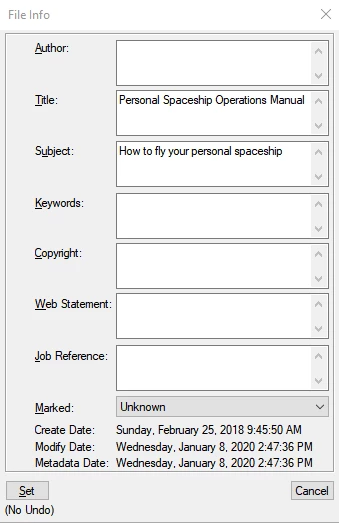
A third party created a template for us and entered some sample (nonsensical) text in the Title and Subject fields of the File Info dialog. When I delete that information, click Set, and close & save the file, the deleted information comes back when I reopen it. I can't get rid of it! Any suggestions would be greatly appreciated.
This topic has been closed for replies.
Correct answer Jeff_Coatsworth

IIRC that's always been a bug in FM - I think you have to blank out the text and leave a space as a placeholder.

4 replies

Jeff_Coatsworth
Community Expert
Community Expert
April 16, 2020

@VeraD - commenting here won't help push the needle much - you need to vote on the Tracker bug itself to register with Adobe.

Community Expert
January 10, 2020

Hi,


There is already a bug report in the Adobe Tracker.

The bug number is: FRMAKER-6903

https://tracker.adobe.com/#/view/FRMAKER-6903 

The report is for FrameMaker 13 and not 15. You might vote for it and add a comment.


Best regards


Winfried

LinSims
Community Expert
Community Expert
January 10, 2020

Done. It's a stupid, trivial annoying itch, and it can't be that hard of a fix...

LinSims
Community Expert
Community Expert
January 9, 2020

That's not nonsense. That's from the "Parts Catalog" that Adobe provides as sample text for the various tutorials you can use. See C:\Program Files\Adobe\Adobe FrameMaker 2019\Samples\PartsCatalog for the files.


Jeff suggests one workaround. For me, what I do is create a blank document using the Portrait template, then I import all the formats from the other document except for the Document Properties. 


ETA: Oh, yes, and remember to create a brand-new book file from scratch, too, or it'll reappear. The book file stores those properties and I've yet to find a way to get rid of them. Sometimes Frame is like playing whack-a-mole.

erlingn73238727
Participant
January 9, 2020

What's nonsense is that this has apparently "always been a bug," per Jeff's response above, and Adobe has done nothing about it. I'm finding a lot of annoying problems like this.


Thanks for the workaround.

LinSims
Community Expert
Community Expert
January 9, 2020

It's a bloody nuisance, yes, but apparently not enough people have complained about it to Adobe. I think the rationale is that if you are creating a new document based on an old one, you'd want the file info information copied too since that generally happens because you're adding a new chapter to a book.


That doesn't explain why it's impossible to delete the information, though. 🙂


Put a bug in. I'll vote for it.


ETA: And by not nonsense, I meant that it's obvious your third-party template creator used the FrameMaker sample files to create your template for you, or at least used a file that had used those files as a starting point, because that's the File Info from them.

Jeff_Coatsworth
Community Expert
Jeff_CoatsworthCommunity ExpertCorrect answer
Community Expert
January 9, 2020

IIRC that's always been a bug in FM - I think you have to blank out the text and leave a space as a placeholder.

erlingn73238727
Participant
January 9, 2020

Thank you, Jeff! That did the trick.