
Participant
May 11, 2021
Question

Cannot connect to SharePoint Online repository - verify connector installation message

  • May 11, 2021
  • 5 replies
  • 1273 views

I'd appreciate advice on how to connect FM 2020 to SharePoint Online repository.


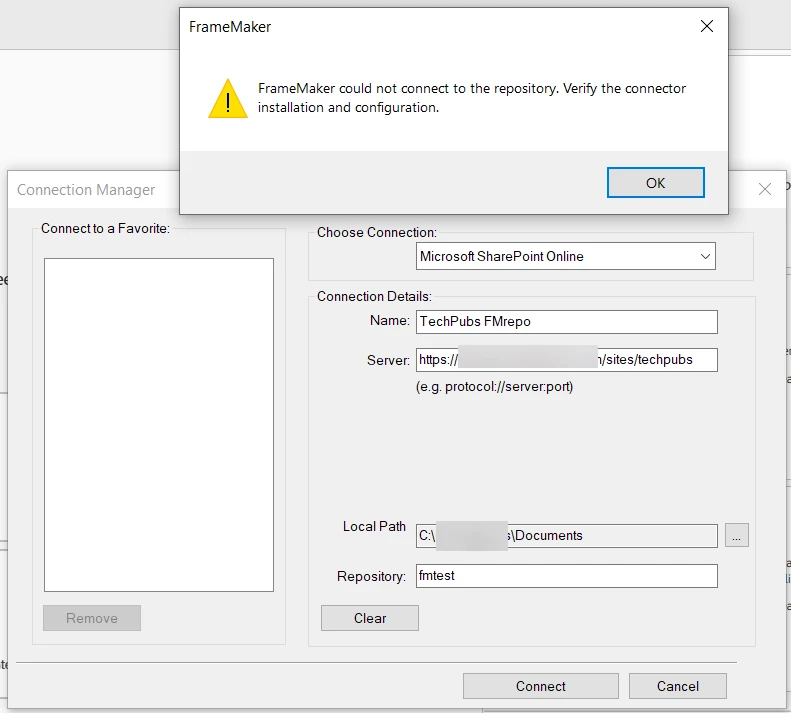
Every time I try to connect to Sharepoint Online repository, FM displays the following message:

FrameMaker could not connect to the repository. Verify the connector installation and configuration.

I'm using FM 2020 and access SharePoint through Office 365. 


To reproduce:

  1. In FM, click Connect to a Repository. 
  2. In the Connection Manager window, select Microsoft Sharepoint Online, enter the server name, create a name, and enter the Repository (In the Repository field, I've tried entering "Documents" or a custom documents folder named "fmtest" (as shown in the following image)). 
  3. Click Connect.


Observed Result:

The connection to the server is successful. A login window appears briefly and the connnection is made to sharepoint online using my login credentials, but then after a few seconds the "unable to connect" message is displayed. 

I also was prompted to allow FM to access SharePoint, and I've seen that FMSPO is listed in My Apps in SharePoint. 


    This topic has been closed for replies.

    5 replies

    Jeff_Coatsworth
    Community Expert
    Community Expert
    September 15, 2023

    @Desiree29475091ehrg  & @TechWriter1597 - I would contact the FM folks - there's not too many people on here that are using SP that can offer solutions (ps - you do know that this forum is user-to-user, right?)

    Participant
    September 15, 2023

    Yup, just hoping someone was given or had found a solution as that's usually faster than waiting on tech support. 🙂 

    Inspiring
    September 19, 2023

    Same thing here, FrameMaker 17.0.2. Sporadically I was able to connect to a fresh set up document library in Sharpoint 365. But after upploading some new folders from a server file share to the document library, connection fails.
    I got an entry in a log file under C:\Users\%username%\AppData\Roaming\Adobe\FrameMaker\fmlogs\17\%date%2023-09-19 10::32::34 [INFO]: Show, 1594 ::----ConnMgrUI::Show started-----
    2023-09-19 10::33::23 [INFO]: CreateCMSConnection, 1700 ::----case ConnType_SpOnline ------
    2023-09-19 10::33::23 [INFO]: LogIfError, 15 ::Dunamis Ingest Submit Event Failed with error : 22
    2023-09-19 10::33::23 [INFO]: SPOConnection, 180 ::----SPOConnection: drivename------
    2023-09-19 10::33::23 [INFO]: SPOConnection, 181 ::%ConnectionDetailsName%
    2023-09-19 10::33::23 [INFO]: SPOConnection, 184 ::----call SharepointLogin------
    2023-09-19 10::33::27 [INFO]: SPOConnection, 209 ::----SPOConnection: LoginSharepoint started------
    2023-09-19 10::33::27 [INFO]: SPOConnection, 212 ::----SPOConnection: getSiteDetails started------
    2023-09-19 10::33::29 [INFO]: SPOConnection, 233 ::----SPOConnection: weburl------
    2023-09-19 10::33::29 [INFO]: SPOConnection, 234 ::https://%sharepoint%/sites/%DocumentLibrary%
    2023-09-19 10::33::29 [INFO]: SPOConnection, 256 ::----SPOConnection: getallDrives-----
    2023-09-19 10::33::30 [INFO]: Create, 84 ::SPOConnection::Create: set connection type
    2023-09-19 10::33::30 [INFO]: createSpOnlineConnection, 415 ::-----createSpOnlineConnection setdata-----
    2023-09-19 10::33::30 [INFO]: createSpOnlineConnection, 438 ::----createSpOnlineConnection: if token wrong connection fail------
    But I have no clue whats going on.

    Participant
    September 15, 2023

    Hi,

    Even I am getting the same error.


    Please help.

    Participant
    September 14, 2023

    has there been a resolution to this?  I'm having the same issue. 

    Participant
    September 18, 2023

    Hi, 

    This solved my issue. I do not know how it is solved.

    Do the configuration said on the following website:

    https://www.siteforinfotech.com/record-logs-charles-proxy-windows/

    That's it, try to connect to the CMS


    Jeff_Coatsworth
    Community Expert
    Community Expert
    May 12, 2022

    Think you should contact the FM folks on this one - see https://helpx.adobe.com/contact/enterprise-support.other.html#framemaker for your Adobe Support options. I'd recommend using the tcssup@adobe.com e-mail address as it reaches a team dedicated to Technical Communication Suite products including FrameMaker.

    Participant
    May 11, 2022

    I am having a very similar issue. I tried to connect to SharePoint Online with both FrameMaker 2019 and 2020 with the same settings: 


    I get the same result with both. An Office 365 login credentials window appears. After I enter my credentials, I get the following message:


    On some subsequent attempts, I get a blank message box in place of the login credentials window. When I close the box, I get the same error message.


    I monitored the SharePoint admin page during the connection attemtps. Not sure I should expect one, but I never saw a pending API request.


    Unlike the OP, I could not find an FMSPO in the SharePoint repository site apps page, the SharePoint store, or the web. I couldn't find any other Adobe app, for that matter.


    Can I get FrameMaker to generate a log file when the error occurs?


    What am I missing?