Inspiring
December 5, 2024
Answered

Cannot create palette in FM 2022 (or FM2020)

  • December 5, 2024
  • 1 reply
  • 874 views

Through FM 2019, I could create a custom palette, by:

1. Creating an FM document with the desired content

2. Saving that document as MIF

3. With a text editor, changing the statement:

      <DViewOnlyWinPalette No>

    to

      <DViewOnlyWinPalette Yes>

   and saving the result..

4. Opening the modified MIF file in FM

5. Saving the result as View Only


When I tried the same steps in FM 2022, FM crashes. In fact, opening the modified MIF file in FM 2022 and using Esc F l k to lock it crashes. For my latest tests, I created a new Portrait document, saved it to MIF, and used that as my test case.


How do I create a palette for FM 2022?


    --Lynne

 

    This topic has been closed for replies.
    Correct answer frameexpert

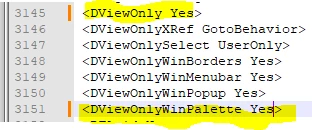
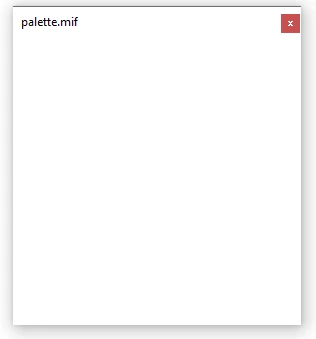
    Hi Lynne, I am using FrameMaker 2022, 17.0.3 and I got it to work with these settings.


    1 reply

    frameexpert
    Community Expert
    frameexpertCommunity ExpertCorrect answer
    Community Expert
    December 5, 2024

    Hi Lynne, I am using FrameMaker 2022, 17.0.3 and I got it to work with these settings.


    Inspiring
    December 6, 2024

    Wow, Rick, so making the file View Only in Mif instead of Save As is the difference! 

    I have 3 real palettes I am trying to create. I will let you know if that works.

    Thank you.

             --Lynne

             --Lynne

    frameexpert
    Community Expert
    Community Expert
    December 6, 2024

    I made a bunch of interfaces like this in the old FrameScript days. Now I usually use ExtendScript for my palettes but who knows how long that will be supported by Adobe.