Inspiring
December 2, 2022
Answered

Cannot get custom shading to work when I insert my table

  • December 2, 2022
  • 1 reply
  • 645 views

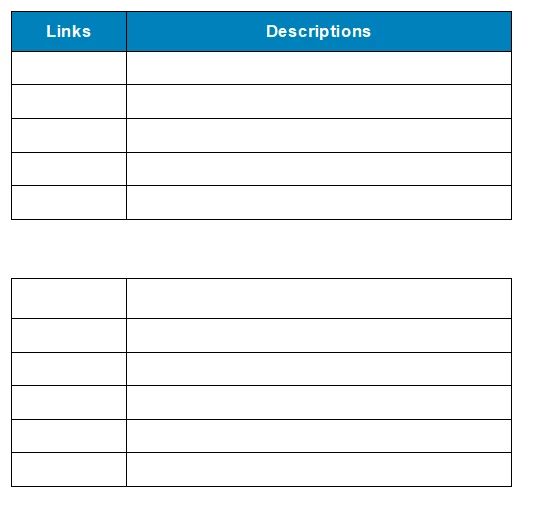
I created a table with a heading row of blue background and white letters.

Using custom shading.

When I insert the table it gives me everything BUT the shaded heading row. See image.

    This topic has been closed for replies.
    Correct answer Matt-Tech Comm Tools

    Yes, you can set up 2 different paragraph styles, with autonumbering in each set to display the Links/Description text. 

    Apply those para styles to the heading cells, then update your table style to store the paragraph style pattern. 

    The table style also stores the pattern of your first body row styles, as well as your footing row styles.

    1 reply

    Matt-Tech Comm Tools
    Community Expert
    Community Expert
    December 2, 2022

    When you say custom shading, are you talking about the Custom Ruling and Shading panel?

    To get the heading to format upon insertion, you'll need to define the format using the Table Designer. You'll also want to redefine the CellHeading paragraph format to White before updating the table format so it gets stored with the table format properly.

    -Matt


    -Matt Sullivan, FrameMaker Course Creator, Author, Trainer, Consultant
    Inspiring
    December 2, 2022

    Thank you. I just had the CellHeading wrong. Is there a way to preserve the column headings (Links, Description) so they automatically insert with the table? Maybe something to do with the Numbering tab?

    Matt-Tech Comm Tools
    Community Expert
    Matt-Tech Comm ToolsCommunity ExpertCorrect answer
    Community Expert
    December 2, 2022

    Yes, you can set up 2 different paragraph styles, with autonumbering in each set to display the Links/Description text. 

    Apply those para styles to the heading cells, then update your table style to store the paragraph style pattern. 

    The table style also stores the pattern of your first body row styles, as well as your footing row styles.

    -Matt Sullivan, FrameMaker Course Creator, Author, Trainer, Consultant