
Legend
December 19, 2018
Answered

Cannot get rid of hash pattern for table cell padding

  • December 19, 2018
  • 1 reply
  • 649 views

Hi,

FM2019, Windows 10, although I've had this problem for other OSs and FM versions. I'm just now trying to fix it. In a file converted from an older version of FM, I get a hash pattern for cell padding, where it did not exist previously:
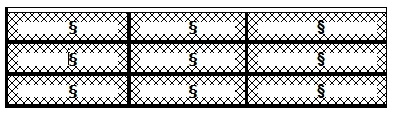
I can't figure out how to make it go away. If anyone can help me, I'll tell Santa Claus that you were good this year. Here is a sample file:

http://www.weststreetconsulting.com/misc/temp.fm

Thanks,

Russ

    This topic has been closed for replies.
    Correct answer Winfried Reng

    Hi Russ,

    That's the condition indicator of the table.

    You can check it, when you hide the condition indicators.

    Best regards

    Winfried

    1 reply

    Winfried RengCommunity ExpertCorrect answer
    Community Expert
    December 19, 2018

    Hi Russ,

    That's the condition indicator of the table.

    You can check it, when you hide the condition indicators.

    Best regards

    Winfried

    Russ WardAuthor
    Legend
    December 19, 2018

    Dr. Reng, thank you! I had no idea. But what confuses me... I have all settings of the condition set to "as-is". Is there no way to hide the indicators, except to hide them for all conditions in the entire document? If so, this must be a change from some earlier version.

    Russ

    Community Expert
    December 19, 2018

    Hi Russ,

    I agree. The table should not get this condition padding, when the condition colour and background is set to As Is.

    I do not remember, if this was the same in earlier versions.

    However, when you hide the condition indicators, you always hide all condition indicators. You cannot hide only a subset. This is the same as in previous versions.

    Best regards

    Winfried