

Inspiring
September 7, 2023
Answered

Cannot get tabs to work in SeparatorsIX paragraph style between index entry and page number in Index

  • September 7, 2023
  • 2 replies
  • 535 views

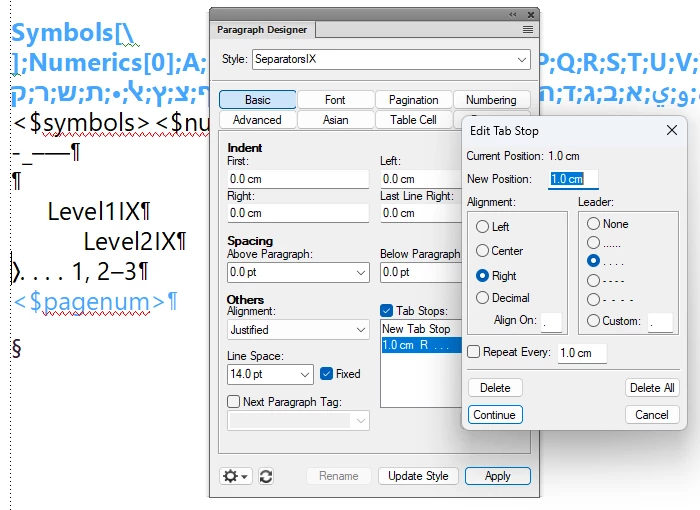
I've tried this in both the Personal Speceship demo files and in a document of my own. I go into the Reference page of the Index.fm file, find the SeparatorsIX paragraph style and put a tab with leader dots just before the page number. When I regenerate the TOC and Index, the page number still has no space between it and the index entry. 
    This topic has been closed for replies.
    Correct answer frameexpert

    Delete the tab character that you added to the beginning of the Level1IX and Level2IX entries. Leave the tab stop that you defined for those formats. Go to the SeparatorsIX paragraph and replace the leading space with a tab character. You do not have to add a tab stop to the SeparatorsIX paragraph.


    You won't see any changes until you update the Index.

    2 replies

    Community Expert
    September 7, 2023

    Hi, @TCBill ,

    sorry to tell, but you are editing the wrong entry.

    "SeparatorsIX" just defines what happens, if there is more than one index-entry.

    Just above the "SeparatorsIX" you find entrys for every index-level you are using.

    Define your tab-position there for every level used.

    Regards

    Stephan


    ps: Just one more thing: the tab itself must be set in front "SeparatorsIX", best as "\t".


    TCBillAuthor
    Inspiring
    September 7, 2023

    I may just be too stupid to come in from the rain, but I put the tabs and leaders in the Level1IX and the Level2IX styles and it still didn't work.


    frameexpert
    Community Expert
    frameexpertCommunity ExpertCorrect answer
    Community Expert
    September 7, 2023

    Delete the tab character that you added to the beginning of the Level1IX and Level2IX entries. Leave the tab stop that you defined for those formats. Go to the SeparatorsIX paragraph and replace the leading space with a tab character. You do not have to add a tab stop to the SeparatorsIX paragraph.


    You won't see any changes until you update the Index.

    Community Expert
    September 7, 2023

    Hi,

    Did you check that your tab stop position works?

    Insert a tab stop manually in your index before a page number. Is the page number shifted to the right? Otherwise adapt the position of the tab stop.

    In your screenshot you have 1 cm. That would mean that the text before the tab stop is shorter than 1 cm to have any effect.

    In FrameMaker the position is absolute from the beginning of the paragraph.

    Best regards, Winfried