Inspiring
March 12, 2021
Answered

Cannot get the autonumber of figures and table to be included in generated files

  • March 12, 2021
  • 4 replies
  • 476 views

I have a TOC that works for a file with autonumbering. When I generate a LOT or LOF all I get is the figure/table name and page number. No line like Table 6-9 table name.


    This topic has been closed for replies.
    Correct answer Barb Binder

    Yep. I'm confused too. Are you trying to integrate the figure titles and table titles into your TOC, or are you trying to generate 3 separate lists? Specifically, are you trying to create a:

    1. Table of Contents (TOC),
    2. List of Figures (LOF) and
    3. List of Tables (LOT)?


    If you are trying to generate 3 separate lists, let's start with the LOF:

    1. In the book window, select the Table of Contents and choose Insert > List of > Figures
    2. Add FigureTitle to the left column, and click on OK, Update.
    3. Choose Window > Consolidate to dock the LOF.
    4. In the LOF file, choose View > Reference Pages.
    5. Navigate to the LOF Reference page (likely the last one, but not always.) Confirm the page by looking at the status bar. See screen shot, below:
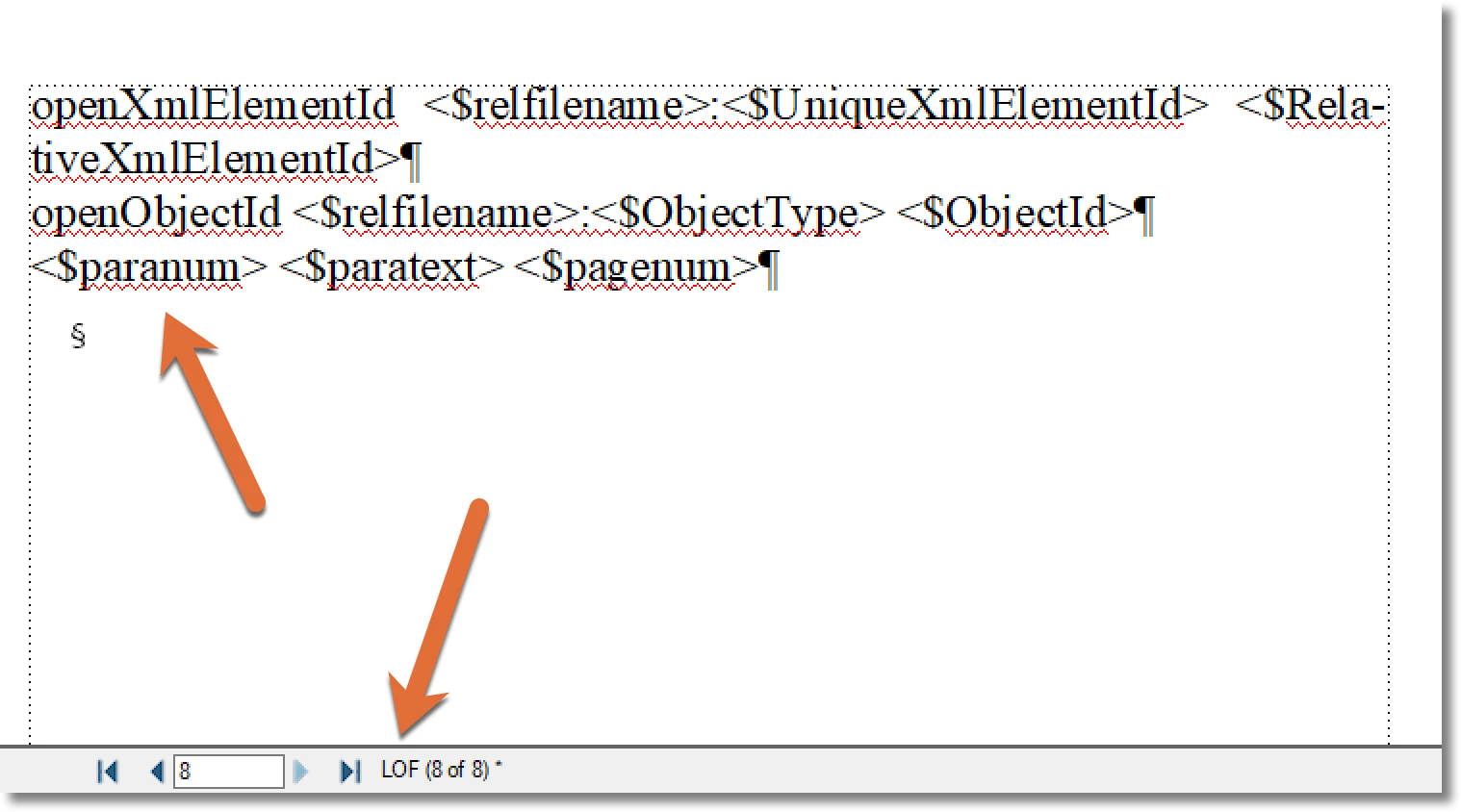
    6. Add <$paranum> on this page. Then update the book.


    ~Barb 

    4 replies

    Barb Binder
    Community Expert
    Community Expert
    March 12, 2021

    Hi Ken:


    Yes, I got your note this morning and tried to reply, but it bounced back for some reason. Anyway, what it said was "Thank you so much for taking the time to let me know. It was a great start to my day. 😀"


    So again, thank you!


    ~Barb 


    P.S. Yes, it the exact same proceedure for a List of Tables—just add <$paranum> to the LOT reference page.

    ~Barb at Rocky Mountain Training
    Barb Binder
    Community Expert
    Barb BinderCommunity ExpertCorrect answer
    Community Expert
    March 12, 2021

    Yep. I'm confused too. Are you trying to integrate the figure titles and table titles into your TOC, or are you trying to generate 3 separate lists? Specifically, are you trying to create a:

    1. Table of Contents (TOC),
    2. List of Figures (LOF) and
    3. List of Tables (LOT)?


    If you are trying to generate 3 separate lists, let's start with the LOF:

    1. In the book window, select the Table of Contents and choose Insert > List of > Figures
    2. Add FigureTitle to the left column, and click on OK, Update.
    3. Choose Window > Consolidate to dock the LOF.
    4. In the LOF file, choose View > Reference Pages.
    5. Navigate to the LOF Reference page (likely the last one, but not always.) Confirm the page by looking at the status bar. See screen shot, below:
    6. Add <$paranum> on this page. Then update the book.


    ~Barb 
    ~Barb at Rocky Mountain Training
    Inspiring
    March 12, 2021

    Thanks Barb! I think that was what frameexpert was trying to tell me. I just did not connect the dots. I assume that is the same for Tables? I have already thanked you by email today for your trick in getting rid of unresolved fonts in a blog!

    Barb Binder
    Community Expert
    Community Expert
    March 12, 2021

    Did you update your book after adding <$paranum>? Reference page changes don't take effect until you update your book.

    If you have, please show us your paragraph designer > numbering properties for the TableTitle or Figure Title style (or both).


    Also, the font in your very first screen shot (of the LOF results) is a different font than the last screen shot (of the building blocks on the reference page). Did you change the font in between taking the two screen shots, or are you not showing us the TableTitleLOT and FigureTitleLOF styles in that last screen shot?


    ~Barb

    ~Barb at Rocky Mountain Training
    Inspiring
    March 12, 2021

    I deleted the LOF and LOT files. I was getting confused.


    Here is my current TOC reference lines. The Figure Heading and TableTitle are listed below that.


    openXmlElementId <$relfilename>:<$UniqueXmlElementId> <$RelativeXmlElementId>
    openObjectId <$relfilename>:<$ObjectType> <$ObjectId>
    <$paranum> <$paratext> <$pagenum>
    <$paranum> <$paratext> <$pagenum>
    <$paranum> <$paratext> <$pagenum>


    frameexpert
    Community Expert
    Community Expert
    March 12, 2021

    Go to the TOC Reference page in your document and add the <$paranum> or <$paranumonly> building block to the appropriate paragraph in the TOC flow.

    Inspiring
    March 12, 2021

    I already have $paranum in the lines: