Known Participant
October 4, 2018
Question

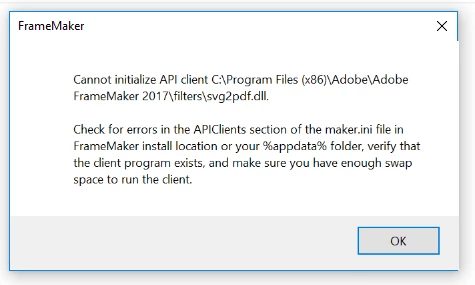
Cannot initialize API Client
  • October 4, 2018
  • 11 replies
  • 1334 views

I have script which does book 2 dita for 2 books. During second book it shows above error. but books are same, no problems with inputs ? does anybody know what does this problem mean ?

11 replies

Participant
January 8, 2025

Could you tell me how to resolved the issue? Thank you. 

Jeff_Coatsworth
Community Expert
Community Expert
January 8, 2025

@sun_4220  - they probably upgraded to a new version that supports more memory. Rather than tagging onto an old thread, maybe you should start a new one with whatever problem you'e having.

Known Participant
October 4, 2018

I have not disabled autospell check yet. Seems, Close(1) frees some memory.

When I do book2dita by hand it doesn't work at all. I need to get all .fm files and save to dita.

I am still thinking that it is possible to free unused memory. I will open new questions maybe someone knows that.

Big Thanks.

Inspiring
October 4, 2018

freeing memory is not possible by script and even not by FDK

Known Participant
October 4, 2018

Thanks, I close files/books and I see in the end around 900 Mb. seems it frees the memory but it should not be 900 MB if it frees it properly.

But I'm thinking that there is a way to delete the object of the book/FM files.

Inspiring
October 4, 2018

Glad to here diabling autospell check works (at least that way the books process well).

There are some other memory issues in FrameMaker which cause these memory effect. Maybe SVG graphics could be another cause.

Check if Memory behavior is the same when you process both books by hand, So you can be sure (or not) that it's not your script which causes these problems.

With FM2019 some of These effects are solved. And with FM 201964bit FM is able to allocate more RAM so this will also solve this out-of-Memory issue

Known Participant
October 4, 2018

Thanks, where can I deactivate it ?

Inspiring
October 4, 2018

Edit > Preferences > Spellchecking > Options

Checkbox: Auto spell check

Known Participant
October 4, 2018

I'm thinking if i can close the files/books after saving to dita will fix this  ? is this true ?

Inspiring
October 4, 2018

1100 MB is the value where FM runs out of Memory...

Closing Files is an approach indeed, if it solves this issue, you'll see.

Please deactive auto Spellchecker, to be sure you don't run into same trap than me.

Otherwise it's hard to find a good algorithm to avoid Memory issues. Good luck with this.

Otherwise try FM2019 64bit, that's the easier way

Known Participant
October 4, 2018

It shows error after 1100 MB

I use frame maker 17

Known Participant
October 4, 2018

When I click ok it shows again and I click ok, it shows same, sometimes it saves some .fm file to dita and then shows the following problem:

Inspiring
October 4, 2018

this Error-Screenshot just means: FM has crashed no more Information available

Known Participant
October 4, 2018

No. I run script which does book2dita for one book, when it finishes for the first one, then it starts for the second one. I do all within one script

Known Participant
October 4, 2018

becuase i copied one from another. I think this issues comes from the ram.

frameexpert
Community Expert
Community Expert
October 4, 2018

This is an error at FrameMaker startup I think. Are you starting FrameMaker fresh for each book?

Known Participant
October 4, 2018

2 run for 2books. it finishes the first one then start second for the same books. so seems content okey if it is working for one book.

Inspiring
October 4, 2018

you run the same process für 2 (different) books. The first ist OK the seconds has this error. So why are you assuming that Content is OK, when content is different?