


Flyxwire
Participant
Sep 1, 2017 4:43 AM UTC
Question

Cannot Lock File. Can't save or edit. HELP! Using Framemaker 2017

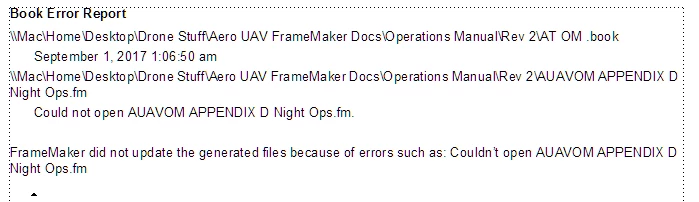
I'm working with a book and have a 2 page appendix that I'm now unable to edit or save. It states "Cannot lock this file for your use. Your changes to it may conflict with other users.

I can't save any edits or save as under another name. There are no .lck files on computer. All files are on local disk.

Any suggestions?

Thanks in advance.
    This topic is closed to new replies. Start a new post to keep the conversation going.

    8 replies

    jayaflir
    Inspiring
    Oct 10, 2019 9:17 AM UTC

    This message appeared to me, as well. I believe it was caused by me changing - and lengthening - one of the folders in the directory path. I shortened the folder name; the message no longer appears; and I appear to be able to work as expected.

    Translate
    Participant
    Apr 6, 2023 8:44 PM UTC

    Thanks. That worked for me. 


    Translate
    Matt-Tech Comm Tools
    Community Expert
    Community Expert
    Sep 6, 2017 7:02 PM UTC

    Make sure that your Aero UAV directory is set to share under Parallels.

    I use vmware Fusion, and can get this error if the file exists in a directory that is not writable to Windows.

    Translate
    -Matt Sullivan, FrameMaker Course Creator, Author, Trainer, Consultant
    Jeff_Coatsworth
    Community Expert
    Community Expert
    Sep 1, 2017 12:42 PM UTC

    Is there already a lock on the file? Usually you'd get a message about it being locked & an invite to clear the lock on the file. Have a look for any .lck files in your folders when FM is closed.

    Translate
    Flyxwire
    FlyxwireAuthor
    Participant
    Sep 1, 2017 2:35 PM UTC

    With Framemaker closed I did full search for .lck files. None found.

    Translate
    Jeff_Coatsworth
    Community Expert
    Community Expert
    Sep 1, 2017 2:57 PM UTC

    Did you check the file's permissions? Maybe it got set to read-only..

    Translate
    Legend
    Sep 1, 2017 10:23 AM UTC

    Are you running FM on a VM on Mac (just asking because of the \\Mac\... path? Maybe there is something blocked there?

    Can you duplicate the file in the file system and open this copy directly in FM?

    Translate
    Flyxwire
    FlyxwireAuthor
    Participant
    Sep 1, 2017 2:34 PM UTC

    I'm running Framemaker 2017 on Windows 8.1 under Parallels 13. It has no problem saving all the other files in the book. It's just this specific file that seems to be locked.

    Translate