Participant
May 11, 2020
Question

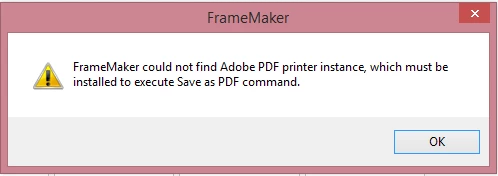
cannot save as PDF in FrameMaker

  • May 11, 2020
  • 2 replies
  • 870 views

How can I solve this problem? Thanks


    This topic has been closed for replies.

    2 replies

    LinSims
    Community Expert
    Community Expert
    May 13, 2020

    When you installed FrameMaker, did you include the "headless" PDF creator/distiller? Do you also have Acrobat Pro installed? As I recall, having both can create conflicts, so if you do have both, try this:


    1. Uninstall Acrobat Pro.
    2. Uninstall FrameMaker.
    3. Reinstall Acrobat Pro.
    4. Reinstall FrameMaker with a custom installation and deselect the PDF creator. I forget what this looks like, but it should be an obvious selection.

     

    tim137Author
    Participant
    May 11, 2020

    I have tried solution 1 in Adobe PDF printer is missing | Manually install PDF printer​ . It didn't work.

    And for solution 2, I couldn't find  Documents\*.pdf (Adobe PDF) in the drop-down list.


    Also, I have tried https://helpx.adobe.com/framemaker/kb/unable-install-pdf-creation-add-on.html to install distiller, but I cannot locate the folder AdobePDFCreationAddOn12_x86_x64. 


    May I know if there are other solutions?

    Community Expert
    May 11, 2020

    Hi tim137,


    Which FrameMaker version do you have? Do you have the latest update?


    Your issue is something for the Adobe support. Contact tcssup@adobe.com

    They should be able to help you.


    Best regards


    Winfried

    tim137Author
    Participant
    May 11, 2020

    I am using Framemaker 2019 and updated to the latest.


    Contacted tcssup@adobe.com and waiting for the reply. Thanks