
Known Participant
November 2, 2020
Question

cannot save framemaker to disk

  • November 2, 2020
  • 4 replies
  • 547 views

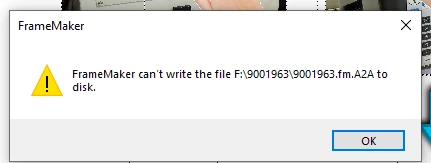
everything was going great saving about every 20 minutes to prevent data loss, and i am geting this error. if i cant find a quick solution i will have to exit the program and load from the last save, which i really dont want to do. Any solutions for this?!
This topic has been closed for replies.

4 replies

Community Expert
November 2, 2020

Can you either open a new instance of FrameMaker and new document and copy paste the content from the active file into a new one, or create a new doc in the open instance of FrameMaker and copy paste the content of the active file into new file there?


Bjørn Smalbro - FrameMaker.dk
beau5CC8Author
Known Participant
November 2, 2020

adobe support told me when this error occurs there is no way to recover, i did exactly that. i luckily didnt write as much as i thought. my serice manuals contains alot of pictures and cad models. i copired and pasted the text. i was having a hard time geting the images to copy so i just redid that. Thanks again

Jeff_Coatsworth
Community Expert
Community Expert
November 2, 2020

Still not 100% clear as to where your FM installation is located & where the project's files are being stored. If your installation is on c:\program files\ and the project is on F:\, you should be able to work fine. Have you tried saving to another location?

beau5CC8Author
Known Participant
November 2, 2020

sorry i was not very clear, fm installation is located on the c drive. i have been saving to a portable ssd drive F. I am now saving the files on the C drive. I assume when the saving to a different drive that framemaker is not installed this can cause issues>?

Community Expert
November 2, 2020

You can save to whatever location you choose. You are merely creating a fm file. Doesn't matter where FrameMaker is installed.

Bjørn Smalbro - FrameMaker.dk
Jeff_Coatsworth
Community Expert
Community Expert
November 2, 2020

That looks like a temp file name that FM assigns as it goes - where is that "F:\" drive located and where is your FM installed?

beau5CC8Author
Known Participant
November 2, 2020

F: is a samsung portable ssd drive, i am not saving to the C: drive and backup files to the ssd at the end of the day

beau5CC8Author
Known Participant
November 2, 2020

i meant i am now saving to the C:/ drive, i started saving to a portable samsung ssd drive because i was having slow running issues using the C:/ Drive . This is the first timei have encountered the issue

beau5CC8Author
Known Participant
November 2, 2020

i tryed to save to different disks and change the format, no luck.. i will be loosing an hour of work if i cant find a quick solution