

Fightergator
Inspiring
September 23, 2022
Question

Capture Replacement Group Doesn't Work in ExtendScript

  • September 23, 2022
  • 1 reply
  • 363 views

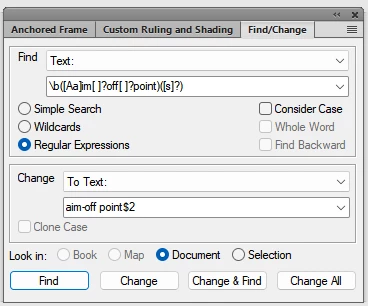
I'm having a problem using capture replace groups in my Find/Change script.  For example, I'm fixing missing hyphenation in phrases.  I find "aim off points" using \b([Aa]im[ ]?off[ ]?point)([s]?) and replace it with aim-off point$2, which should give me "aim-off points" as my replacement. My find/replace works perfectly using FMs Find/Change panel (see below).  When I try it in my script I get this result:  aim off pointaim-off points$2. The $2 capture group searches for the plural of "points."  In my script tester I am using this to mimic the FM Find/Change panel:

FindReplace ("\\b([Aa]im[ ]?off[ ]?point)([s]?)", "aim-off point$2");  I've searched the blogs, reviewed K. Daube's Find/Change PDF, and tried various syntax combinations, without luck.  Any help much appreciated. 
 

    This topic has been closed for replies.

    1 reply

    K.Daube
    Community Expert
    Community Expert
    September 26, 2022

    Fightengator, I would use another RegEx:

    Search:       \b(A|a)im off point

    Replace:     $1im-off point

    this works for me correctly both in FM Find/Change and in my own script FMfindRepl.

    IT depends on your general case how the RegEx should look then.

    Fightergator
    Inspiring
    September 26, 2022

    Thanks K. Daube, I'll give that a try.  That's a good idea for using the first capture group to capture the case.  However, my real goal is to use a second capture group to capture the capture the word suffixes; i.e., "fine-tune, fine-tuning, fine-tunes, or fine-tuned and add it to the replacement.  When I use:

    Search: fine-tun([eing]{1,3}) //matches fine-tune and fine-tuning

    Replace: fine-tun$1

    I get "fine-tun$1" as the replacement.  I'm sure I'm doing something wrong with my search / replace strings, but haven't succeeded yet. 

    Fightergator
    Inspiring
    October 1, 2022

    Was traveling all last week, so just now getting back to this issue.  I figured out why the replace script isn't appending the $2 capture group correctly.  I'm not using an actual FM ChangeToText function.  Instead I'd built a simple routine that inserted a replacement string at the end of the text that was found using doc.AddText.  Accordinly, it inserts my replacement text literally; "fin-tun$2".  I need a script to insert the replacement text using a function that mimics the FM ChangeToText dialogue.  If I'm unable to figure it out on my own, will start a new post to the forum.