Inspiring
February 2, 2016
Answered

Center Text in a Cell

  • February 2, 2016
  • 2 replies
  • 4988 views

Hi all, I am new to FrameMaker 10. I am trying to edit an existing table. want to center text in a cell and nothing i try in table designer has worked. any help appreciated. thanks

This topic has been closed for replies.
Correct answer Stefan Gentz

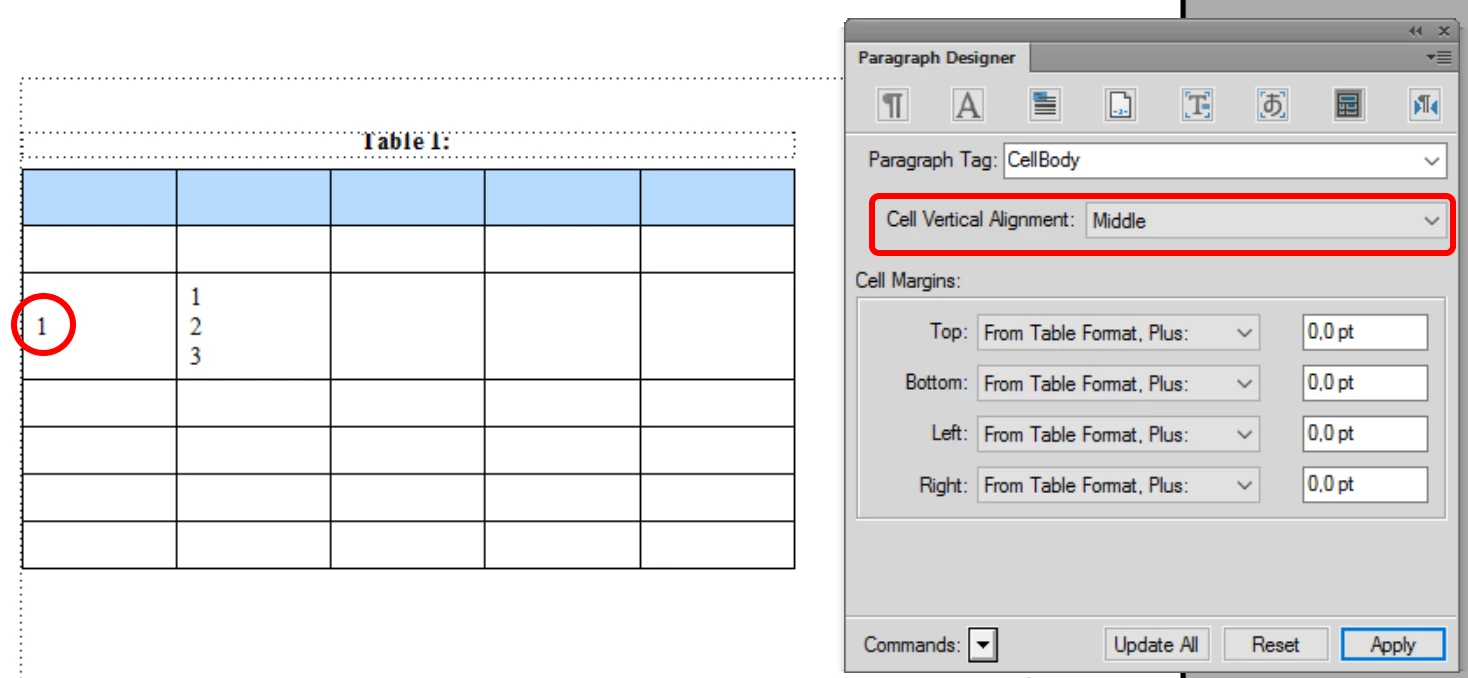
Like Arnis Gubins‌ said, you can find this option in the paragraph designer in the table cell options:

2 replies

Stefan GentzCommunity ManagerCorrect answer
Community Manager
February 2, 2016

Like Arnis Gubins‌ said, you can find this option in the paragraph designer in the table cell options:

Inspiring
February 2, 2016

Thank you. I would have thought that part of table designer that mentions centering would have done the trick. I never would have thought paragraph designer.

Inspiring
February 2, 2016

Myko,

   Just to summarize and motivate what Stephan and Arnis have already said:

  1. FrameMaker allows you to specify both vertical and horizontal alignment. You can specify vertical alignment for cells within a table row and horizontal alignment for the entire table or for the content of an individual cell.
  2. In common English usage, "middle" and "center" can often be used interchangeably; FrameMaker reserves "middle" for vertical alignment and "center" for horizaontal alignment.
  3. While it is quite natural to assume at first that alignment properties should be specified in the table designer, after some consideration you will realize that the contents of different cells in a table may have different alignment. For example, cells with textual content are open left-justified or centered whereas cells with numeric content are often right-justified. Alignment of the content of a cell, therefore, cannot be set as a table property. It's even possible for a cell to contain multiple paragraphs, which have different alignment. For example, a cell may contain a centered title that applies to the following left-aligned (or justified) paragraph. Thus, cell alignment logically needs to be a paragraph property.
  4. When a table is not as wide as the text frame or column in which it appears, you can align the entire table on the left, center it, or align it on the right. This horizontal alignment property must be set in the table designer because it applies to the table as a whole.
  5. Horizontal alignment is set on the basic page (first tab) of the paragraph designer because it is commonly set for paragraphs outside of tables also and the first page of the designer holds the most common properties. Vertical alignment is specific to tables and appears on the table page (next to the last page on the right).

I hope this explanation makes it easier to remember where to find this information in the future.

        --Lynne

Arnis Gubins
Inspiring
February 2, 2016

Use the paragraph property for the paratag used in the table cell to make it centred.

Inspiring
February 2, 2016

Thank you. That worked.