
MR89
Inspiring
March 13, 2018
Answered

Centering reference graphics in Body pages?

  • March 13, 2018
  • 1 reply
  • 603 views

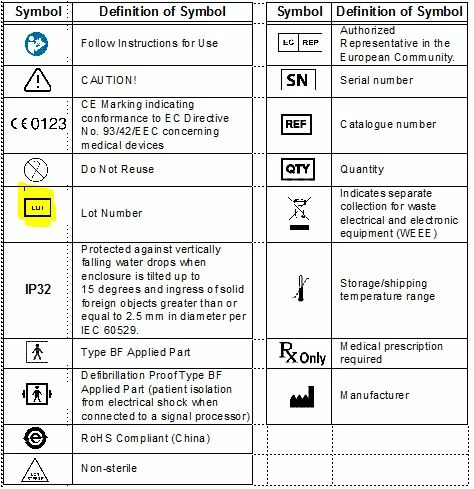
I set up reference graphics in my table, but I'm not sure how to center them vertically.  The table below is one of several tables with the same symbols.  When I use the associated paragraph tag for the symbol, it pops in there nicely into each table, but none of the highlighted graphic below will center vertically in any of the tables.

When I set various options such as "Indents and Spacing" within the Paragraph Designer, nothing happens.  The graphic is not in an anchored frame when inserted, but it is in a frame within the reference pages, per Barb's training instructions.  I could not find any instructions anywhere online on how to center these graphics.  Luckily, all the other graphics are already centered somehow , although they have the same settings as the highlighted one.  I did try moving the graphic around inside the anchored frame on the reference page, but it's a poor method for centering multiple reference graphics...

You can see my cursor at 2pt font right above the graphic...
The graphic in the Reference Page:

Anyone with experience on the matter is appreciated!  Thank you!

    This topic has been closed for replies.
    Correct answer __AG__

    When centering paragraphs within tables, you need to specify the Cell vertical alignment option on the Table Cell tab of the Paragraph designer. Note, if you're using a referenced graphic with the paragraph tag, then the placement of the graphic above or below the paragraph will affect the vertical positioning, likewise with anchored frame placements in a paragraph. You may need to experiment to find your optimum setting.

    1 reply

    __AG__
    __AG__Correct answer
    Participating Frequently
    March 13, 2018

    When centering paragraphs within tables, you need to specify the Cell vertical alignment option on the Table Cell tab of the Paragraph designer. Note, if you're using a referenced graphic with the paragraph tag, then the placement of the graphic above or below the paragraph will affect the vertical positioning, likewise with anchored frame placements in a paragraph. You may need to experiment to find your optimum setting.

    MR89
    MR89Author
    Inspiring
    March 13, 2018

    Thank you!