shruthib13016439
Participant
January 11, 2018
Answered

Change cross reference color

  • January 11, 2018
  • 2 replies
  • 3216 views

When I insert cross reference the default color is black. Is there a way to change the cross reference color to blue such that every time I insert the cross reference the font color is blue automatically

This topic has been closed for replies.
Correct answer Dave Creamer of IDEAS

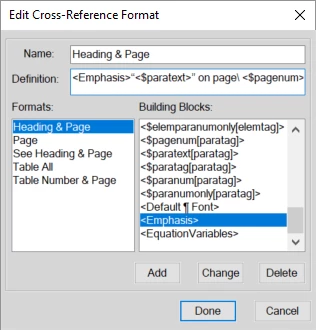
You can insert Character tags/styles into the cross reference definition. Create the character style first, then insert the styles are at the end of the building blocks.

If you need more info on how to do that, let me know.

2 replies

Barb Binder
Community Expert
Community Expert
January 11, 2018

Hi shruthib13016439,

Are you trying to change the X-ref marker color or the X-ref text color? You can do either one with a character format.

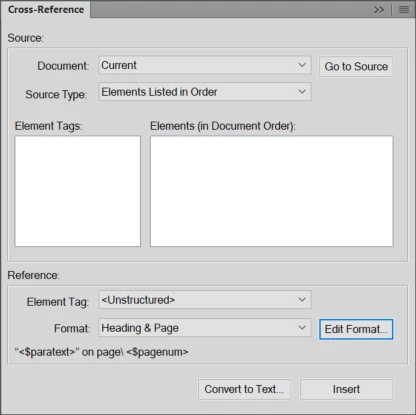
Text color: edit the Cross-Reference definition and add a character tag in < > in front of the current definition. The available options appear at the very bottom of the building blocks list.

Marker color: use Find/Change: Marker-of type: Cross-Ref and set Paste to change the character format.

Note: editing the X-ref definition will change all X-ref text at one time. If you are trying to change the marker color, you have to run the find/change that after you add more markers.

If you need more details, let me know.

~Barb

~Barb at Rocky Mountain Training
meredithshort
Participant
September 6, 2018

Hey Barb. You have been an absolute genius in the past so I totally trust you! And yet, I can't make this work. I created a Character Tag (<Hyperlink - BLUE>) and tried to add it as a Building Block in the Edit Format part of the Cross Ref pod. Then I used the Find/Change pod and chose Marker-Of Type but Cross-Ref wasn't an option. So it was like I could apply that change to ONE cross-ref but not all. Gah!

Any other suggestions?

Thanks as always.

Meredith

Barb Binder
Community Expert
Community Expert
September 6, 2018

Hi Meredith:

First of all, thank you for your trust. That totally makes my day.

So the question is how to assign a character tag called Hyperlink - BLUE to all the x-refs using a specific format?

  1. Create new character format and add it to the Character catalog.
  2. Choose the x-ref format, click on Edit Format.
  3. Click an insertion point at the beginning of the Definition line.
  4. Scroll to the bottom of the building blocks list and click to add the character tag to the beginning of the definition.
  5. Click on Change, Done and Replace.

This will update every occurrence of that x-ref format. No need for Find/Change.

~Barb

~Barb at Rocky Mountain Training
Dave Creamer of IDEAS
Community Expert
Dave Creamer of IDEASCommunity ExpertCorrect answer
Community Expert
January 11, 2018

You can insert Character tags/styles into the cross reference definition. Create the character style first, then insert the styles are at the end of the building blocks.

If you need more info on how to do that, let me know.

David Creamer: Community Expert (ACI and ACE 1995-2023)
Barb Binder
Community Expert
Community Expert
January 11, 2018

Dave,

You are a.) up early, and b.) type way faster than I do!

~Barb

~Barb at Rocky Mountain Training