
Known Participant
May 17, 2018
Question

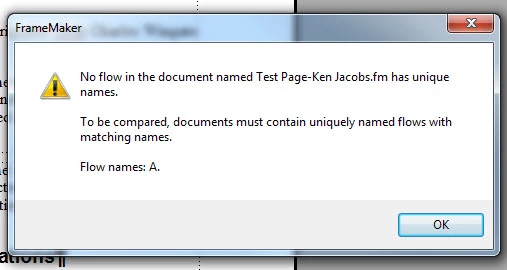
Change flow name; cannot compare documents with same flow name error

  • May 17, 2018
  • 1 reply
  • 527 views

I imported a Word doc for a client into FM 2015. Then he had me make changes  and save as a revised doc and wants to see the changes. when I try to compare I get a dialog that says documents need to have uniquely named flows. How do I do that so I can compare the two?
    This topic has been closed for replies.

    1 reply

    Barb Binder
    Community Expert
    Community Expert
    May 19, 2018

    Hmmm. I've never see that message before.

    Here's how Compare Docs works: Adobe FrameMaker: Compare Documents (Part II in the Editing Series) - Rocky Mountain Training

    Now, taking the message at its word, here's how flow tags work:

    1. The flow tag appears in the status bar, in the lower left corner of the Fm window, right above the Windows start menu. Start by clicking in the text on page one and note the flow tag in both files. Are they the same or different? Flow A is the default, but even if you are new to Fm, I can't imagine you changed the flow tag without realizing it.
    2. To answer your question, you can change the flow tag by going to Graphics > Object Properties > Text Frame > Tag.

    Do you have multiple flows in the files? Or in one file?

    Also, at the bottom on the link I posted above, I noted that Adobe Acrobat Standard/Pro (not Reader) has the same feature. That may also be a solution for you if you don't figure out what is going on with FrameMaker.

    ~Barb

    ~Barb at Rocky Mountain Training