

Community Expert
December 2, 2024
Answered

Change order of appearance in TOC?

  • December 2, 2024
  • 2 replies
  • 599 views

I am building a small template meant for FM 2022. I have an issue with the TOC.. The TOC is to show Section titles, Chapter titles and Heading Titles.

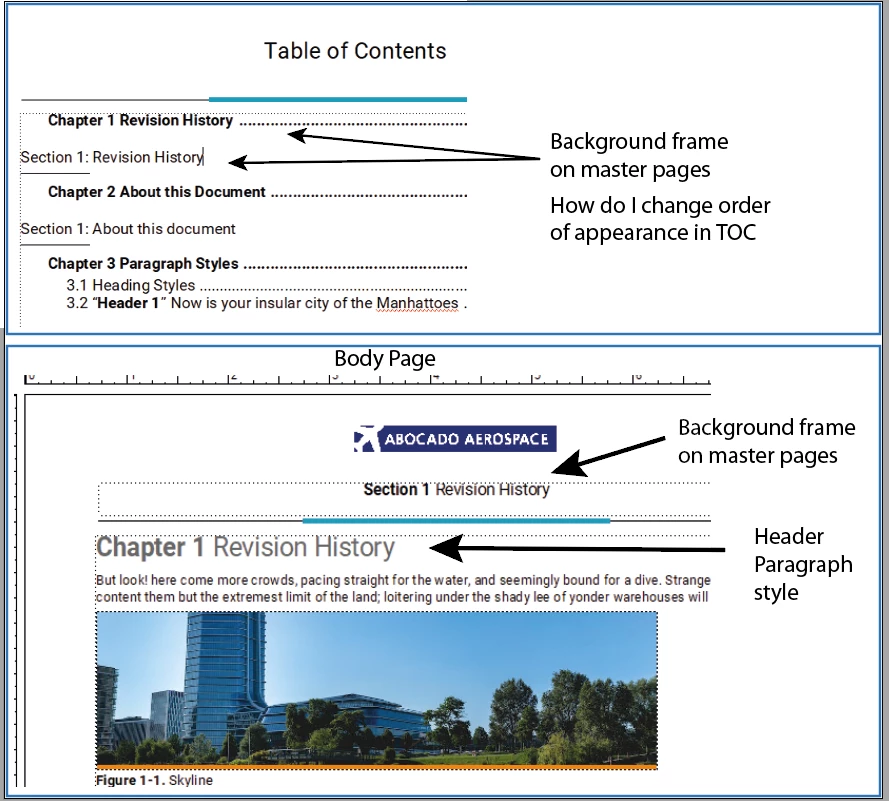
The Section Titles reside on a background frame on the Master Pages as can be seen in the illustration here.

My issue is... I would like the Section Title to appear in the TOC BEFORE the Chapter Titles. But is it possible to change the order of appearance?



    This topic has been closed for replies.
    Correct answer frameexpert

    You could try using Graphics > Arrange to change the order of the text frames on the master page, but I think FrameMaker always lists the main flow paragraphs first in generated lists.

    2 replies

    Bob_Niland
    Community Expert
    Community Expert
    December 2, 2024

    If the document is small and stable enough, converting the TOC from generated to manually maintained Xrefs would be a solution.

    To stay generated, perhaps create a new ¶format to use in Flow A, that's hidden (perhaps by ColorViews), and using the Section Variable, or Xref'd to the Section string. Have the TOC generate from that (make sure the TOC lacks the hidden color name/def).

    There's a decent chance I don't have the full picture here, because I would not have guessed that lists can generate from MP content (if only because the same MP may be used for multiple body pages).

    Community Expert
    December 3, 2024

    Thank you. That was ingenious. I did not really think about that solution, but it absolutely an alternative.

    Bjørn Smalbro - FrameMaker.dk
    frameexpert
    Community Expert
    Community Expert
    December 2, 2024

    Hi Bjørn, Are those paragraphs in the same text flow?

    Community Expert
    December 2, 2024

    No. The Section Title resides in its own text box, making it accessiblet to use from the body pages. Thing is - I have decided I want to make a template with a "List of Effective Pages", and in order to make that work, I have added disconnected text frames on the master pages.

    Bjørn Smalbro - FrameMaker.dk
    frameexpert
    Community Expert
    frameexpertCommunity ExpertCorrect answer
    Community Expert
    December 2, 2024

    You could try using Graphics > Arrange to change the order of the text frames on the master page, but I think FrameMaker always lists the main flow paragraphs first in generated lists.