
Inspiring
March 24, 2024
Answered

Change straight quotes to smart quotes (FM2022)

  • March 24, 2024
  • 2 replies
  • 560 views

I've converted a 60,000+ manuscript from a plain text editor to FrameMaker. In the plain text document both the opening and closing quotation marks (around dialogue) use the " (double quotes). How can I convert them into the appropriate  (smart opening quotation) and  (smart closing quotation) respectively? 

Straight Quotes are turned off in my Preferences, so the smart quotes appear when I manually type them in the FM document (needless to say I'm not keen on doing this manually.)

    Correct answer Barb Binder

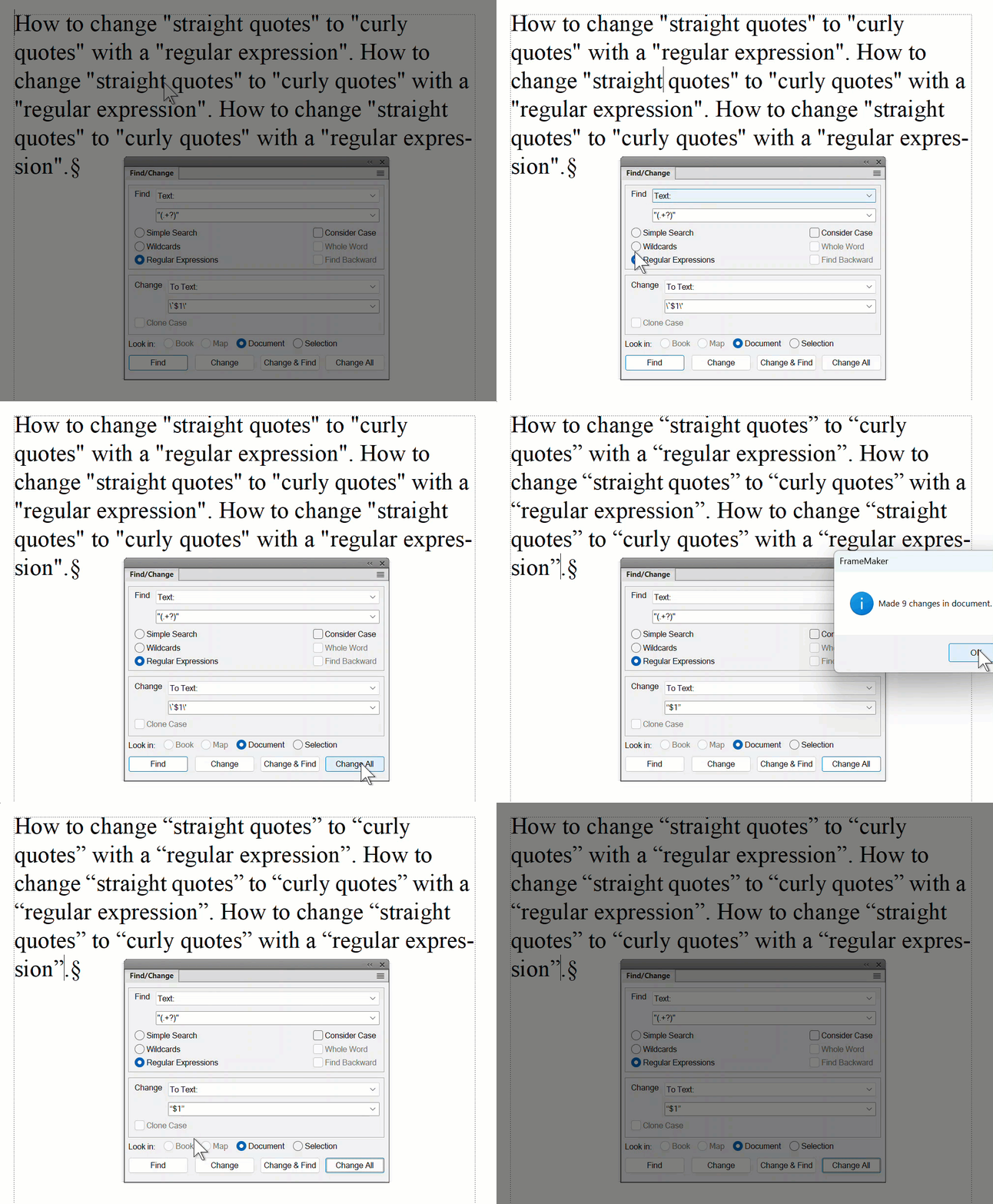
    I use the following expression in Find/Change. (Save before you run it!)


    Find: 


    "(.+?)"


    Enable the Regular Expression radio button 

    Change: 


    \`$1\'


    Note: FrameMaker will change the \` (backslash left apostrope) to an open curly quote and the \' (backslash right apostrope) to a close curly quote after by run the find/change. You can also just cut/paste the curly quotes into the change field. 


    ~Barb


    2 replies

    Barb Binder
    Community Expert
    Barb BinderCommunity ExpertCorrect answer
    Community Expert
    March 24, 2024

    I use the following expression in Find/Change. (Save before you run it!)


    Find: 


    "(.+?)"


    Enable the Regular Expression radio button 

    Change: 


    \`$1\'


    Note: FrameMaker will change the \` (backslash left apostrope) to an open curly quote and the \' (backslash right apostrope) to a close curly quote after by run the find/change. You can also just cut/paste the curly quotes into the change field. 


    ~Barb


    ~Barb at Rocky Mountain Training
    Inspiring
    March 25, 2024

    @Barb Binder to the rescue!


    That worked like a charm - saved me from replacing 2839 straight quotes with smart quotes. 


    Thanks!

    Community Expert
    March 24, 2024

    Hi,

    Just use Search and Replace.

    For the closing double-quote search for a straight double-quote and a space or punctuation mark and replace by a typographic double-quote and a space or punctuation mark. You can test with regular expressions. I do not have access to FrameMaker today, but you can try this:

    Search for: "([ ,.:;!?])

    Replace: typographic double-quote$1

    It could be that you have to escape e.g. the dot with \. I would have to test this myself.

    Then similar for the opening double-quote.

    And of course there can be double-quotes for inch characters.

    Please make a backup copy and test this very thoroughly, before you do a Change All!

    Best regards, Winfried