
Inspiring
November 22, 2019
Answered

Changes I make in document look like red edits

  • November 22, 2019
  • 3 replies
  • 450 views

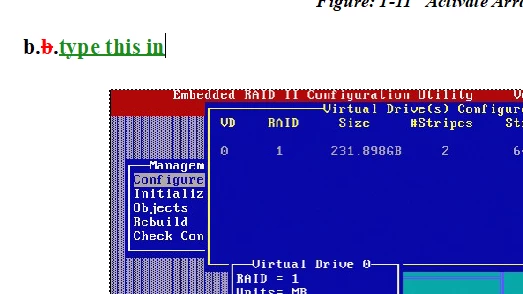
I am reformatting a document in FrameMaker and now when I delete a character it turns red whit a line through it and if I add or change text it shows as green. I am unable to hide it and it does not matter what the paragraph style is the result is the same. Below is a screen shot of when I deleted a letter a and then typed the words type this in 
 

This topic has been closed for replies.
Correct answer LinSims

You've got Track Text Edits turned on. 


Click Edit > Track Text Edits > Disable to turn it off.

Click Edit > Track Text Edits > Accept All to get rid of the tracked edits.

3 replies

LinSims
Community Expert
Community Expert
November 22, 2019

You might want to sign up for Matt Sullivan's Introduction to FrameMaker 2019 course, then. It's free and gives a good general overview of the UI as well as basic information on creating templates and the like.


You can also find recorded webinars here. Search for FrameMaker to get pertinent webinars: https://meetus.adobeevents.com/technicalcommunication/

Inspiring
November 23, 2019

Actually signed up for that yesterday. The only challenge I have with that is a lot of the topics that I need help with ASAP are locked until a certain day. Most say "available in 3 days" or something to that effect. I plan on watching all of them but just don't have access to all of them. Thank you for the suggestion!

LinSims
Community Expert
Community Expert
November 24, 2019

Yes, for some reason the seminars have built-in timed gaps. You can't watch them one right after the other. You have to watch one which unlocks the next a day later, I think it is.


He also has a book available that is a pretty good user guide. And  you might go to Klaus Daube's site and get his compendium, which has a lot of tips and tricks that are quite useful.

Inspiring
November 22, 2019

Thank you I was pretty sure that was the issue but I have only been uysing FrameMaker for about a week so I barely know where anything is.

LinSims
Community Expert
LinSimsCommunity ExpertCorrect answer
Community Expert
November 22, 2019

You've got Track Text Edits turned on. 


Click Edit > Track Text Edits > Disable to turn it off.

Click Edit > Track Text Edits > Accept All to get rid of the tracked edits.