
Inspiring
March 28, 2018
Answered

Changing from "Chapter" to "Appendix" in Header

  • March 28, 2018
  • 3 replies
  • 1773 views

How do I prevent the chapter number of a file in my book from appearing in my running header? I can't figure out how to delete it from the master pages, and it seems like the Chapter Number variable isn't being used. What I really want is to be able to change the word "Chapter" to "Appendix" for just this one file in the book.

    This topic has been closed for replies.
    Correct answer Barb Binder

    Hi Cameo:

    To change the word Chapter to Appendix:

    1. View > Master Pages
    2. Click to select the running head
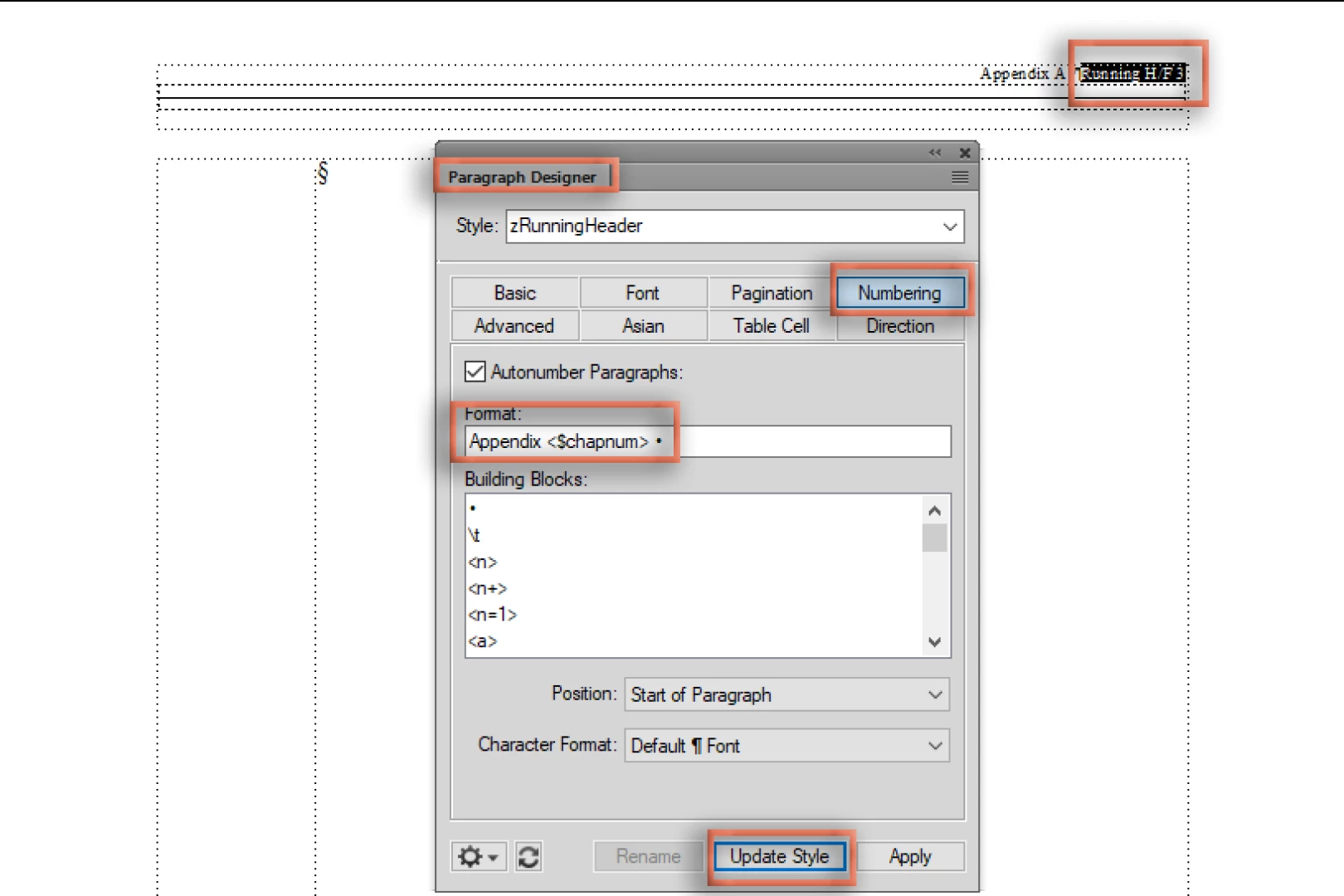
    3. In Paragraph Designer > Numbering, change the word Chapter to Appendix and Update Style.

    ~Barb

    3 replies

    Barb Binder
    Community Expert
    Community Expert
    April 16, 2018

    Hi Cameo:

    I probably should have asked for the book file with the chapters because I can't work through the whole thing, but let's start here:

    1. You have the reference page TOC 8 set up correctly with two paragraph tags: Chapter.name.TOC and Appendix.name.TOC.

    2. But your TOC shows the Appendix names mapping to Chapter.name.TOC and not to Appendix.name.TOC (identifying content X'd out):

    3. So, open the first appendix chapter and click on the Appendix heading—it should be tagged Appendix.name. If it isn't, rename it to Appendix.name. Save the file.

    4. Update your book and check the TOC. If this solves it, repeat for Appendix B.

    ~Barb

    ~Barb at Rocky Mountain Training
    Inspiring
    April 17, 2018

    Hi Barb,

    That worked! Thank you again for your help!

    -Cameo

    Barb Binder
    Community Expert
    Community Expert
    April 17, 2018

    You are very welcome, Cameo.

    ~Barb

    ~Barb at Rocky Mountain Training
    Barb Binder
    Community Expert
    Barb BinderCommunity ExpertCorrect answer
    Community Expert
    March 30, 2018

    Hi Cameo:

    To change the word Chapter to Appendix:

    1. View > Master Pages
    2. Click to select the running head
    3. In Paragraph Designer > Numbering, change the word Chapter to Appendix and Update Style.

    ~Barb

    ~Barb at Rocky Mountain Training
    Inspiring
    March 30, 2018

    Thank you so much for your help, Barb!

    That did the trick.

    Cameo

    Barb Binder
    Community Expert
    Community Expert
    March 30, 2018

    Excellent!

    ~Barb

    ~Barb at Rocky Mountain Training
    Barb Binder
    Community Expert
    Community Expert
    March 28, 2018

    Hi Cameo:

    It would be helpful to see exactly how your running head is set up so that we can be very specific in our answer, but without seeing it, we can assume it's coming from the master pages, so begin with View > Master Pages. Chances are fairly good that the chapter number is defined in Running H/F 1. You could delete it and just type in Appendix (super quick but not a best practice) or you can edit running H/F 1 to call in the AppendixTitle tag.

    ~Barb

    ~Barb at Rocky Mountain Training
    Inspiring
    March 28, 2018

    Hi Barb,

    I'm not able to delete the "Chapter A" piece. I think it's Running H/F 3 for me. I'm working with an "Appendix A," but the flow of the "A" is Chapter.name. In my paragraph catalog, I have an Appendix.name and an Appendix.number. I did not create these files, so I'm discovering new things with each file I open.

    Barb Binder
    Community Expert
    Community Expert
    March 28, 2018

    Hi Cameo:

    So you trying to change "Chapter A: " to "Appendix A: "?

    The running head is using a ¶ tag called z RunningHeader—are the words "Chapter A:" defined in Paragraph Designer > Numbering? Can you change Chapter to Appendix there?

    If not, it might be quicker to share a few pages of your file. You can post it on dropbox and either click my name and message me a link (private) or post the link here (public).

    ~Barb

    ~Barb at Rocky Mountain Training