
Answered
Changing Paragraph Catalog Setting in a Two-Column IOM
Man I am on a big role this week!!! I should probably be paying you guys!
In my generated Index, I currently have IOMTitleTOC as my paragraph tag for the title Index at the top. In other sections, I have Heading1First for each section heading, and all of those show up in my TOC. The IOMTileTOC disoplays in the TOC, too. However, when I create the PDF, the Index is not in the PDF.
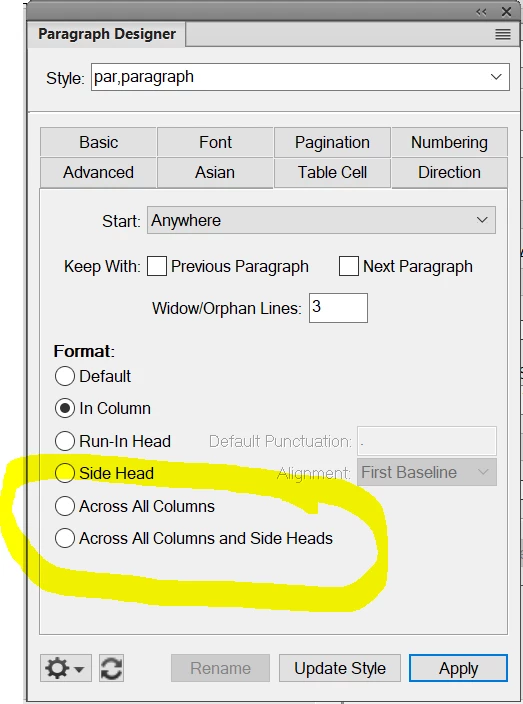
So, I changed the IOMTitleTOC to Heading1First. However, the Index itself is two-column and when I changed IOMTitleTOC to Heading1First, the Index title does not break across both columns. It only is displayed in the first column.
Can you give me an idea how to make the Heading1First span both columns for the Index title?
Thanks!
Ken


 AdChoices