



Inspiring
August 4, 2026
Question

ChapNum in TOC repeats

  • August 4, 2026
  • 15 replies
  • 60 views

I have a TOC template that works flawlessly in every project except the current one. Here’s what I get in the TOC:
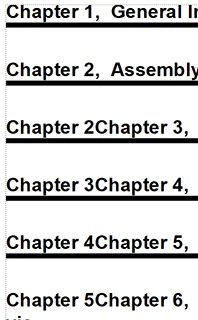
 

Here’s the relevant code from the reference page:



I’m stumped. Any and all insights and help will be greatly appreciated. This TOC is quite long and I don’t relish having to hand-edit it.

Thanks in advance,

Bill

    15 replies

    Jeff_Coatsworth
    Community Expert
    Community Expert
    August 4, 2026

    That’s really strange - it looks like there are 2 problems going on at once - at the point it goes off the rails, it looks like the chapnum variable isn’t being incremented so you get stuck on “Chapter 2” but then where is it getting the “Chapter 3” text from?
    Have you thought about renaming the TOC and generating a fresh “factory” one, then applying the formatting?

    TCBillAuthor
    Inspiring
    August 4, 2026

    Your suggestion was one of the first things I tried. I even imported the reference pages from a known good document just to see if that was the problem. I wish I could just attach the files for you to look at yourself, but they are highly proprietary.

    Jeff_Coatsworth
    Community Expert
    Community Expert
    August 4, 2026

    No need to attach files - just the requested screenshots might help.

    The fact that re-creating the TOC and importing the ref pages implies that there’s something messed up in the chapter .fm files themselves. Do the “bad” links actually work from the TOC? Following them might give you a clue as to what sort of cruft has gotten in there. MIF-washing the files might clear something up too.

    Community Expert
    August 4, 2026

    Hi Bill,

    In your screenshot of teh reference page there is a paragraph mark after <$chapnum>.

    What is the second paragraph with paratext and pagenum? Does the first paragraph have Run-In Head set in the Paragraph Designer in the Pagination tab?

    Could it be that the second paragraph format does not exist in this file?

    Then the first paragraph would run into the next one, but this is not the one which you want.

    Best regards, Winfried

    TCBillAuthor
    Inspiring
    August 4, 2026

    Second paragraph format exists in this file.

    Dave Creamer of IDEAS
    Community Expert
    Community Expert
    August 4, 2026

    Does the <$paratext> have the chapter number applied in the auto-numbering?

    David Creamer: Community Expert (ACI and ACE 1995-2023)
    Dave Creamer of IDEAS
    Community Expert
    Community Expert
    August 4, 2026

    It looks as if the (second) chapter number was typed in by hand and not auto-number. Can you show the auto-number code for the chapter style?

    David Creamer: Community Expert (ACI and ACE 1995-2023)
    TCBillAuthor
    Inspiring
    August 4, 2026

    Nothing was typed in by hand; this is the end result after generating the TOC. There is no auto-number code for the chapter style in the paragraph format;; it’s supposed to pull it as a system variable.

    This TOC template works perfectly in many other documents.

    Dave Creamer of IDEAS
    Community Expert
    Community Expert
    August 4, 2026

    Can you show a screenshot of the chapter style numbering tab?

    David Creamer: Community Expert (ACI and ACE 1995-2023)
    Jeff_Coatsworth
    Community Expert
    Community Expert
    August 4, 2026

    Are each of the chapters separate .fm files? Have you got them set to increment based on the prior file in the book?

    TCBillAuthor
    Inspiring
    August 4, 2026

    Yes, each of the chapters are separate .fm files and the incrementing is as you mentioned: based on the prior file in the book.