Inspiring
June 28, 2023
Answered

Chapter headings have unwanted page breaks right after them. How do I remove these page breaks?

  • June 28, 2023
  • 3 replies
  • 1471 views

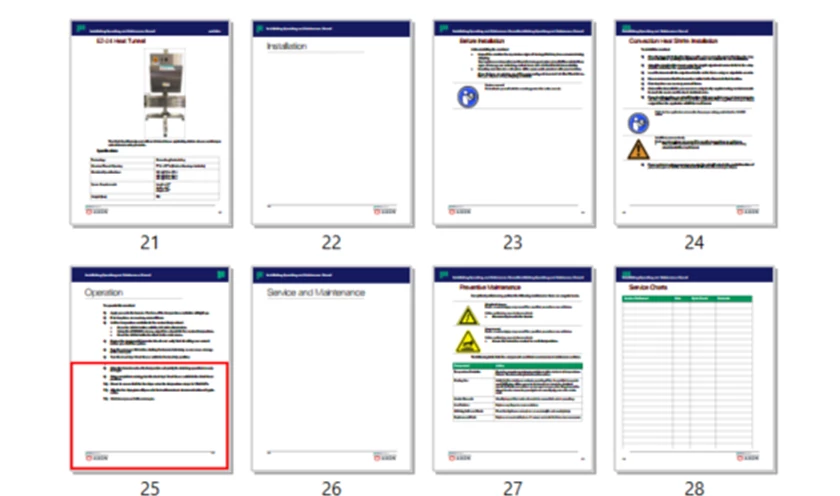
Using Structured Adobe FrameMaker 2022 (Version 17.0.0.226), my chapter headings (e.g., Installation, Service and Maintenance) are immediately followed by page breaks.  I don't want the subchapters to start on the next pages.  I have already tried, in the subchapter heading, clicking Insert >  Publish Marker > Remove All Page Break Markers.  It had no effect.  Please help.  Thanks.


    This topic has been closed for replies.
    Correct answer Brian26375051l7h5

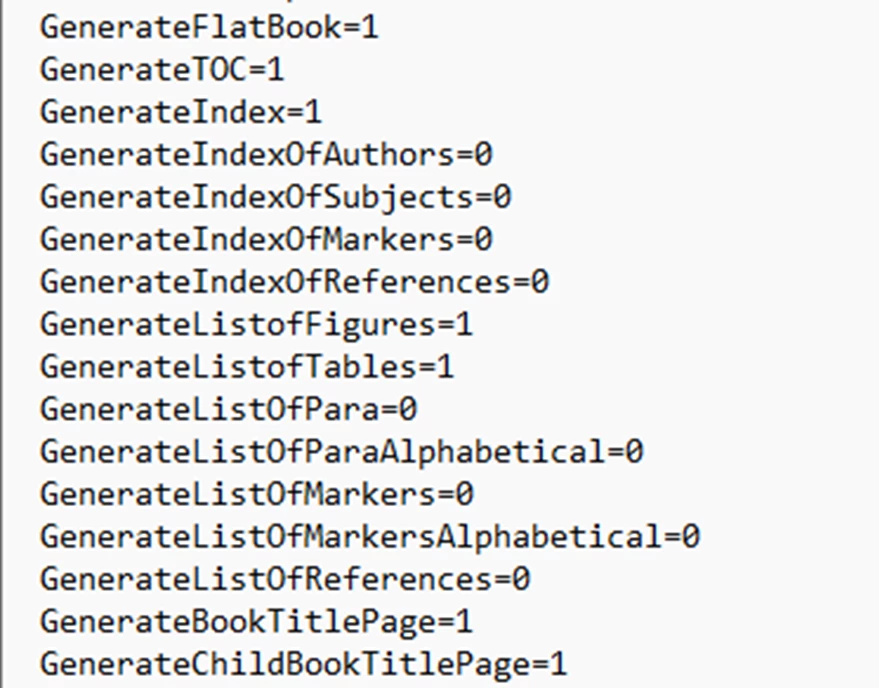
    This problem was actually fixed by a change to my ditafm-output.ini file (buried deep within my C drive).  It was given to me by people who set up my FrameMaker.  GenerateFlatBook and GenerateChildBookTitlePage needed to = 1, not 0. 


    This file needed to be changed both in my Roaming folders and in my Adobe Program folders.  Thanks for all of the responses.

    3 replies

    Inspiring
    June 29, 2023

    To clarify some details here:

    1. Every FrameMaker paragraph (including headings) has a paragraph format which specifies a large number of formatting properties including font, automatic numbering, and spacing before or after the paragraph. Unwanted page breaks can result from the format of the paragraph before or after the break and the interaction of the formats of those paragraphs. Possibilities include:

         a. The paragraph format for the chapter headings specifies that the "space below" the paragraph is so large, the next paragraph flows to the top of the next page.

         b. The paragraph format for the first paragraph following the heading specifies that that paragraph starts at the top of the page.

         c. The paragraph formats for the first and succeeding paragraphs after the heading specify that each of the those paragraphs is kept on the same page as following paragraphs.

       Thus, the first step in diagnosing the problem is determining which paragraph formats cause the break to occur.

    2. Each time you create a new paragraph, by opening an XML document, pressing the Enter key in an existing document, creating a new document from a template, etc, FrameMaker assigns a paragraph format to the new paragraph. 

          a. Every FrameMaker document has a catalog of paragraph formats. Users can add new formats to the catalog as well as delete or modify existing ones. The sample documents included with FrameMaker all have paragraph catalogs. Users can define documents with different catalogs as appropriate to their work. Users can assign formats from the catalog to individual paragraphs.

          b. Users can also assign paragraph formats that are not in the catalog. Once a paragraph has been created, a user can change any of its properties so that it is no longer formatted exactly like other paragraphs that started out with the same format.

    3. Paragraph formats in a structured document are assigned according to format rules in the document's internal element catalog. When you open an XML document, FrameMaker uses a template defined in your structured application. That template in effect is a combination of an XML schema or DTD with a stylesheet. It includes the element catalog which defines the elements to be used in the document, where those elements are valid, and how they are formatted. The formatting for paragraph elements can select a paragraph format from the paragraph catalog, specify values of various paragraph properties, or assign a format and modify some of its properties. The formatting is context sensitive. For example, if you use the same heading element for chapters and sections, FrameMaker can assign different paragraph formats to different occurrences of the heading element.

    4. XSLT is a programming languge that transforms an XML document into a different text format, which may be another XML document. Applications of structured FrameMaker often use slightly different structures within FrameMaker and XML. For example, material can be alphabetized within FrameMaker, lists may be converted to tables, and fixed text can be inserted in certain locations. FrameMaker allows a project to use XSLT to convert from structured FrameMaker to XML and from XML to structured FrameMaker. However, there are many structured FrmeMaker applications that do not require XSLT.

    5.  Finally, to get back to the original question. To "fix" the unwanted page breaks, you need to first analyze the document to determine what is causing the page breaks. Next, you need to analyze how the situation that causes the breaks was created. Is the problem in a format in the paragraph catalog? Is it in the format rules in the element catalog? Who is responsible for maintaining these catalogs?

        --Lynne


    Brian26375051l7h5AuthorCorrect answer
    Inspiring
    June 30, 2023

    This problem was actually fixed by a change to my ditafm-output.ini file (buried deep within my C drive).  It was given to me by people who set up my FrameMaker.  GenerateFlatBook and GenerateChildBookTitlePage needed to = 1, not 0. 


    This file needed to be changed both in my Roaming folders and in my Adobe Program folders.  Thanks for all of the responses.

    Inspiring
    June 30, 2023

    Brian,

       Glad you found the problem. I hadn't had a chance to respond to your message that you had copied all the files listed in your ditamap. That told me two things: first that you are using DITA and second that you had copied all components of your content files but not the configuration files. 

       --Lynne

    Bob_Niland
    Community Expert
    Community Expert
    June 28, 2023

    Check settings for space-below on the headings.
    Check settings for Keeps and space-above on the para types following the headings.

    FM itself has no such object as a Page Break marker. Performing a page break merely applies at Start override to the selected para. I presume these PB Markers are something new for the Publish workflow?

    Inspiring
    June 29, 2023

    Do you mean the Paragraph Designer settings?  I can attempt to change them, but when I save the changes and re-open the file, it's like the change never happened.  


    Respectfully, I really don't know what you mean when you say "Performing a page break merely applies at Start override to the selected para."   What is Start override?   I also really don't know if the PB markers are new for the publish workflow.  I really don't know what a Publish workflow is.  I am using a new Windows 11 PC.  This issue was not a problem on my Windows 10 PC.


    Bob_Niland
    Community Expert
    Community Expert
    June 29, 2023

    re: …I really don't know what you mean when you say "Performing a page break merely applies at Start override to the selected para." What is Start override?

    In FM (Unstructured), there is no isolated data object for Page Break. When you perform an
      Insert ▼ Page Break…
    what it does is set an override in the currently selected paragraph, performing the equivalent of:
      Format ▼ Parapgraph ► Paragraph Designer /Pagination\
      Start: [Top of Page]
      [Apply]
    Note that this is [Apply] and not [Update Style]. This is an override, applying only to that paragraph, and can easily be lost if the style is updated (as a result of various operations).

    Jeff_Coatsworth
    Community Expert
    Community Expert
    June 28, 2023

    Is that the output in the screenshot or your FM pages?

    Inspiring
    June 28, 2023

    The screenshot is of the PDF.

    Jeff_Coatsworth
    Community Expert
    Community Expert
    June 28, 2023

    Isn't output formatting in Structured FM all depending on how you've laid out the XLST transforms? (or something like that - you can tell I don't speak Structured) 🤣