Known Participant
November 13, 2023
Question

Chapter Numbering in Adobe Frame maker
  • November 13, 2023
  • 3 replies
  • 282 views


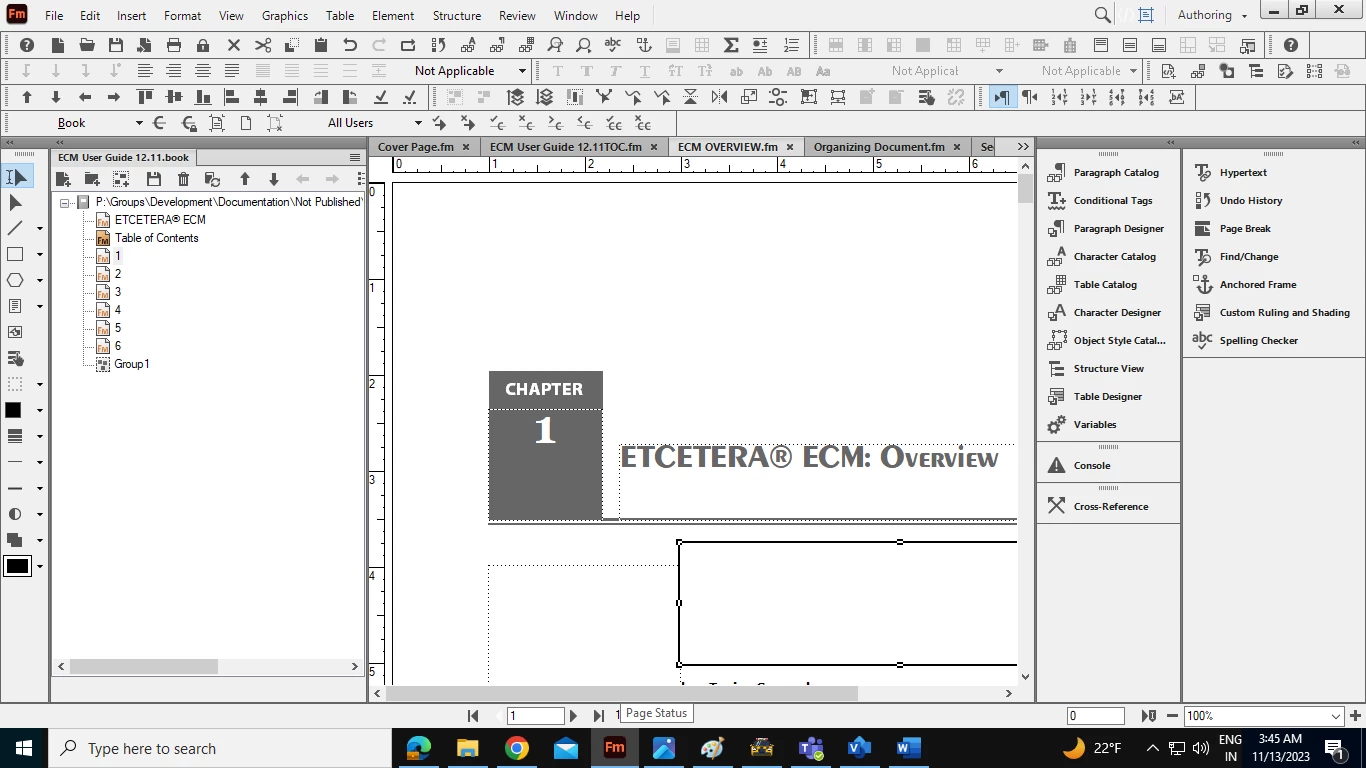
Hi, I want to include "Chapter" in the number 1, 2, 3, 4, 5, and 6 (top left in the book). Please someone suggests how can I do this.

    This topic has been closed for replies.

    3 replies

    Barb Binder
    Community Expert
    Community Expert
    November 13, 2023

    Hi Amit:


    It's not an easy fix—since only you can see the list in the book window, I would leave it as it is. 


    ~Barb

    ~Barb at Rocky Mountain Training
    Barb Binder
    Community Expert
    Community Expert
    November 13, 2023

    Hi Amit:


    You have the book window set to show the first paragraph of each chapter. That's working the way you want for the table of contents and the title page. However, your template has the word Chapter on the master page. Each chapter begins on the body page with just the chapter number—that's why it just shows 1, 2, 3, etc. 


    To add Chapter 1, Chapter 2, Chapter 3 to the book window list, you'd need to add the word Chapter to the auto-number on page 1 and remove it from the master page. 


    ~Barb

    ~Barb at Rocky Mountain Training
    Known Participant
    November 14, 2023

    Thank you for the hints Barb.

    Bob_Niland
    Community Expert
    Community Expert
    November 13, 2023

    You can insert Variable Chapter Number (<$chapnum>) in the box on the various Master Pages.