Participating Frequently
August 19, 2013
Answered

Chapter Title breaking/splitting up in the TOC
  • August 19, 2013
  • 1 reply
  • 1376 views

Hello,

I am using FM11 on Windows 7.0.

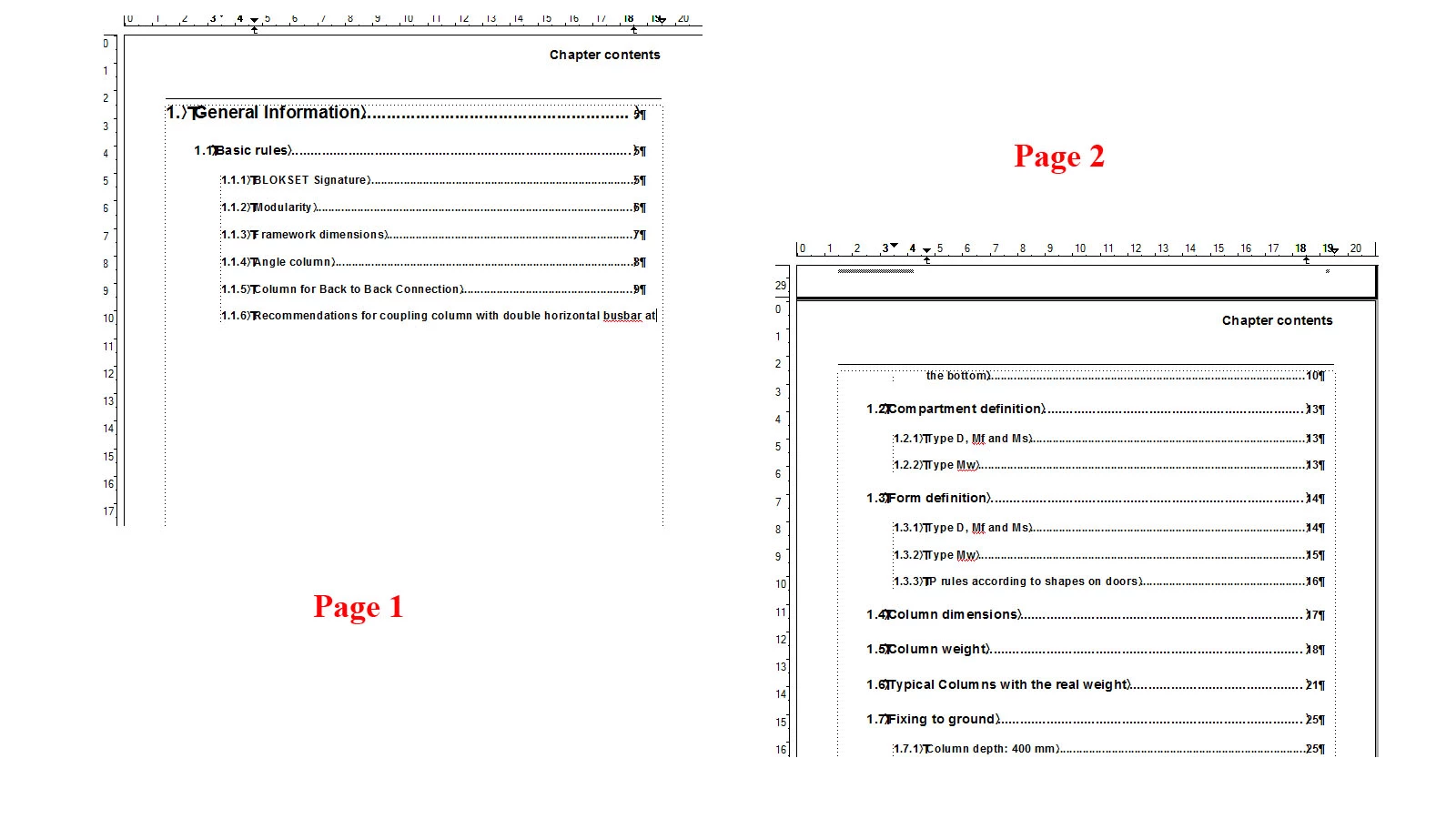
When I update my TOC, one of the chapter titles break up and appear on 2 pages (as shown in image).

I have checked for Page breaks, extra spaces and Paragraph tabs etc.

Also, on pressing backspace the text gets shrinked (squeezed up) and not deleted.

When the chapter title is a single line, the page break dissapears. (I have another file where the chapter title is in 2 line and this works well there).

Help much needed!!

ASAP Please...

This topic has been closed for replies.
Correct answer Arnis Gubins

Actually, the Reference page specifies the content for the TOC to use. The formattting is specified by the paragraph tag/style defined in your paraagraph catalog.

@ Kiathestar,

It looks like you have a Keep With Next setting as well as Widow/Orphan set to 1 in your third-level heading paratags. Adjust these so that the Keep With is turned off and the Widow/Orphan setting is at least 2 lines.

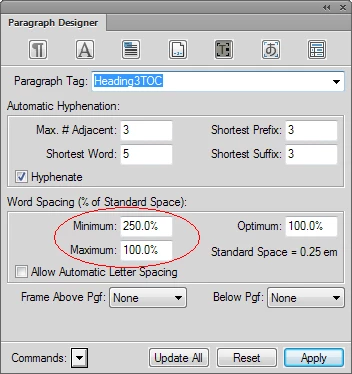
Also if you want to set the wrap properly on any of the TOC entries that span more than one line, in the the respective paratag on the Advanced tab, set the Word Spacing Minimum to be much greater than the Word Spacing Maximum value, e.g.

This (counter-intuitive) setting forces the line to wrap well before the right-margin setting takes effect. The location of the wrap is a function of the min/max ratio and does vary a bit depending upon your typeface and font size. Try values in th 150%-300% range for the Minimum (in steps of 25%) until you get a wrap at a visually desirable location.

1 reply

August 19, 2013

The formatting of ToC entries is controlled in the Reference Pages.  Have you checked there?

We use the Reference Page entries to add a tab automatically if the line breaks in the ToC.  Our instruction for a Toc entry looks like this:

<$paratext>. . . . . . . . . . . . . . . .\t<$pagenum>

The effect of the \t is to introduce an extra tab if the line breaks, so that the page number is still sent to the margin.

Possibly there is something in your Reference Page entries that is forcing a page feed..

Arnis Gubins
Arnis GubinsCorrect answer
Inspiring
August 19, 2013

Actually, the Reference page specifies the content for the TOC to use. The formattting is specified by the paragraph tag/style defined in your paraagraph catalog.

@ Kiathestar,

It looks like you have a Keep With Next setting as well as Widow/Orphan set to 1 in your third-level heading paratags. Adjust these so that the Keep With is turned off and the Widow/Orphan setting is at least 2 lines.

Also if you want to set the wrap properly on any of the TOC entries that span more than one line, in the the respective paratag on the Advanced tab, set the Word Spacing Minimum to be much greater than the Word Spacing Maximum value, e.g.

This (counter-intuitive) setting forces the line to wrap well before the right-margin setting takes effect. The location of the wrap is a function of the min/max ratio and does vary a bit depending upon your typeface and font size. Try values in th 150%-300% range for the Minimum (in steps of 25%) until you get a wrap at a visually desirable location.

August 19, 2013

Quite right; most of the formatting (for example, the font) is controlled using the paragraph tags.  To a small extent, the way the text is formatted to the page in the ToC is also controlled by the Reference page.

For example, if you want the entry to appear with leader dots, you would specify the leader style in the paragraph catalog. But to make the leader dots show up, you have to place a tab in the line on the Reference page. Likewise, to introduce leader dots if the line wraps in the ToC, you can add a \t on the Reference page (at least, that worked for us). It's in this limited sense that I used "formatting."  Sorry for any confusion.