

NinaBR
Inspiring
November 21, 2019
Answered

Character Palette?

  • November 21, 2019
  • 2 replies
  • 641 views

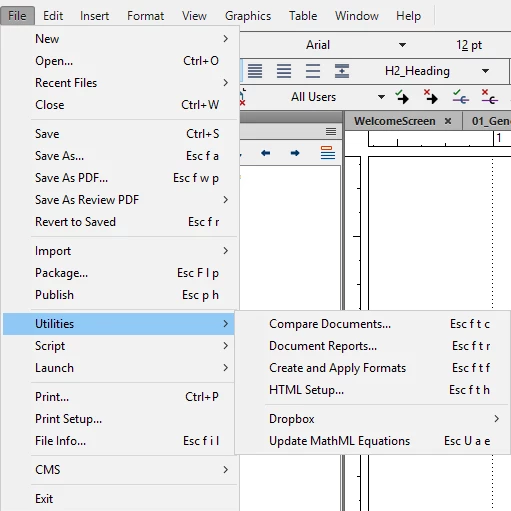
Hi! I need to create a custom bullet in FrameMaker. I have version 15.0.4.751. Looking at several online instructions (such as this one), I'm seeing that I need to go to File > Utilities > Character Palette. I don't have this option in my version of FrameMaker. I went to the FM help, but the latest instructions there also refer to this option. Here is what I have.
 

Before posting this, I realized that the character palette may not be what I need. I specifically would like to use a .png file that I've created as the custom bullet. (Even more specifically - a "danger" icon that is a yellow triangle with an exclamation point inside of it.) If someone can send me a resource on that, or if it can even be done as a bullet, I would appreciate it -- I can't seem to find it and am probably using the wrong search terms. Thanks!

This topic has been closed for replies.
Correct answer LinSims

It's under the Insert menu now.


Insert > Character > Character Palette


ETA: Ah, I didn't see the paragraph under your screen shot. So, the above is how you use the Character Palette, but using a custom graphic image as a bullet isn't possible, AFAIK.


Are you actually making a bulleted list? Because it sounds to me like you're really making a Caution notice, and for those I usually use a two-column, single-row table with the icon in the left column and the text in the right. 


Or you could create a Run-in Heading that uses Frame Above or Frame Below to insert the graphic from your reference page and have your caution text set with a left indent that will keep it from running around the graphic.

2 replies

NinaBR
NinaBRAuthor
Inspiring
November 21, 2019

Thank you! Once again, I knew it had to be something simple! I appreciate your help!

LinSims
Community Expert
LinSimsCommunity ExpertCorrect answer
Community Expert
November 21, 2019

It's under the Insert menu now.


Insert > Character > Character Palette


ETA: Ah, I didn't see the paragraph under your screen shot. So, the above is how you use the Character Palette, but using a custom graphic image as a bullet isn't possible, AFAIK.


Are you actually making a bulleted list? Because it sounds to me like you're really making a Caution notice, and for those I usually use a two-column, single-row table with the icon in the left column and the text in the right. 


Or you could create a Run-in Heading that uses Frame Above or Frame Below to insert the graphic from your reference page and have your caution text set with a left indent that will keep it from running around the graphic.