
Known Participant
December 1, 2020
Answered

Character style not taking on Paragraph main format

  • December 1, 2020
  • 2 replies
  • 371 views

Hello -- I have one file in a 32 file book that is not correctly displaying the correct character style format.


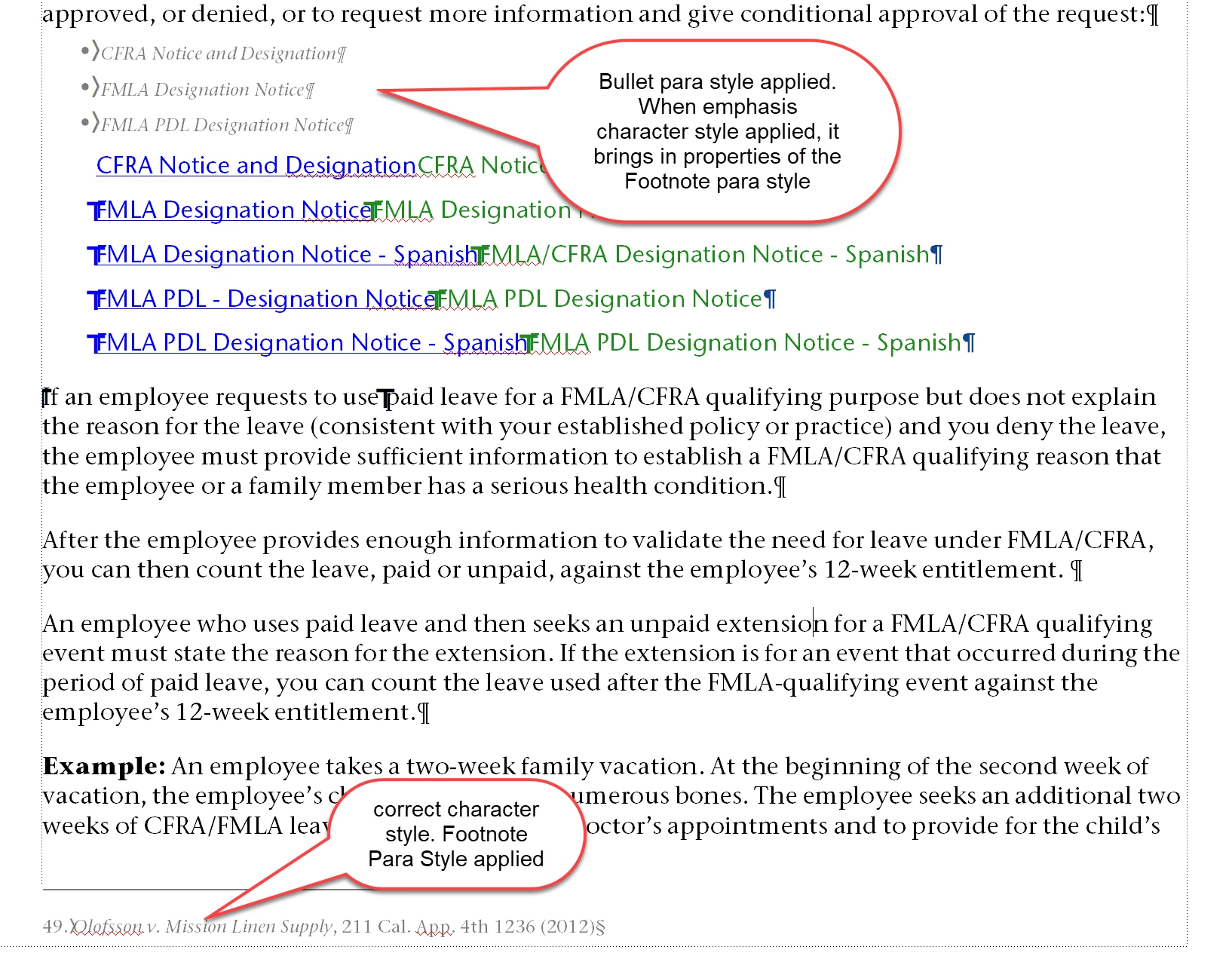
There is a footnote paragraph style that uses 7.5 pt, 51% process grey font. When we are reference a legal case name, we italicize it using a character style called emphasis (see attached images).


We also use the emphasis character style in the main text, which for decades had worked just fine. However, now -- in just one file, applying the emphasis character style anywhere in the body, it brings in the properties of the footnote paragraph style. Previously it would simply ital and leave the other paragraph style properties as-is. 


Here's what I've tried to no avail:

  • MIF wash
  • Importing character styles from a file that's working as designed. It does nothing at all.
  • Setting up the Character Designer to match the default font properties -- except the italics (this changes the footnote italics to match the main body text).

System:

Windows 10

FM 19 v15.0.6.956


    This topic has been closed for replies.
    Correct answer Winfried Reng

    Hi,


    Could it be that someone saved this character format with the insertion mark in the footnote paragraph?

    Then all settings which were As Is before will now have the settings of this paragraph format.

    You can check this, when you click outside of any text frame. Then open this character format in the character designer. Compare this with a file where this character format works as expected.


    Best regards


    Winfried

    2 replies

    Barb Binder
    Community Expert
    Community Expert
    December 3, 2020

    Hi @trickyblain3:


    It looks to me like an override issue or an issue with the character style definition—I'm happy to take a look at a page from the .fm file to help you figure it out. 


    On a side note, I'm curious why you are formatting the bullet paragraphs with a character style in the first place. Typically, we use a paragraph style to define the entire paragraph, and then apply a character style to selected words within the paragraph, to make them stand out. We don't normally apply a character style to an entire paragraph.


    ~Barb 

    ~Barb at Rocky Mountain Training
    Known Participant
    December 3, 2020

    Hi Barb,


    In that case, it was a form title with no other text (we ital form titles). I use the styles just like you say, but it probably wasn't the best image example to use. 


    I figured out that one of the editors changed the "as-is" definitions to define attributes. Fixed. Thanks!

    Winfried RengCommunity ExpertCorrect answer
    Community Expert
    December 2, 2020

    Hi,


    Could it be that someone saved this character format with the insertion mark in the footnote paragraph?

    Then all settings which were As Is before will now have the settings of this paragraph format.

    You can check this, when you click outside of any text frame. Then open this character format in the character designer. Compare this with a file where this character format works as expected.


    Best regards


    Winfried
