
Participant
August 3, 2021
Answered

Clear Markers of a Single Type from a Book

  • August 3, 2021
  • 2 replies
  • 412 views

We have started using a custom marker to create revision highlights sections for our books.   I would like to find out if it is possible to clear out the markers between revisions.  


In addition to the custom marker used for revisions, we are using two other types of markers to denote regulatory references.   As a result, we don't want to clear all markers, just the custom one. 


Is there a method to accomplish this?  
    This topic has been closed for replies.
    Correct answer Matt-Tech Comm Tools

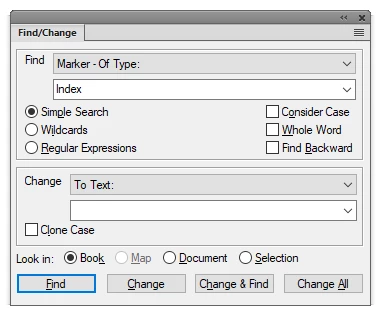
    Have you tried using the Find/Change (Ctrl+F) dialog to search for Marker-Of Type: [markername]?

    To clear the existing markers, use the Change>To Text option with an empty text field.

    -Matt

    2 replies

    FLLDianeAuthor
    Participant
    August 26, 2021

    I just wanted to check in to say that this worked out perfectly.   Thanks so much for the suggestion!

    Matt-Tech Comm Tools
    Community Expert
    Community Expert
    August 26, 2021

    Glad to hear you got it to work!

    On top of the direct choices given, the ability to replace with (nothing) and the ability to replace with the vague content of the clipboard are powerful options within the Find/Change in FrameMaker.


    -Matt

    -Matt Sullivan, FrameMaker Course Creator, Author, Trainer, Consultant
    Matt-Tech Comm Tools
    Community Expert
    Matt-Tech Comm ToolsCommunity ExpertCorrect answer
    Community Expert
    August 3, 2021

    Have you tried using the Find/Change (Ctrl+F) dialog to search for Marker-Of Type: [markername]?

    To clear the existing markers, use the Change>To Text option with an empty text field.

    -Matt

    -Matt Sullivan, FrameMaker Course Creator, Author, Trainer, Consultant
    FLLDianeAuthor
    Participant
    August 3, 2021

    I'm not sure if we have tried this.  I think we tried to clear the marker content using the find option, but I don't think we tried changing the marker into blank text.  

    Thank you for the recommendation!  I'll let you know how it works out. 

    Matt-Tech Comm Tools
    Community Expert
    Community Expert
    August 3, 2021

    Think of it as using Find to select the type of marker, and replacing it with a null.


    The same technique can be used to find something, and replace with whatever is on the clipboard (Change by Pasting), which also creates some interesting possibilities.


    -Matt

    -Matt Sullivan, FrameMaker Course Creator, Author, Trainer, Consultant