
Inspiring
October 15, 2021
Answered

Coding Reoccuring Table to work with "Ruling" script

  • October 15, 2021
  • 2 replies
  • 348 views

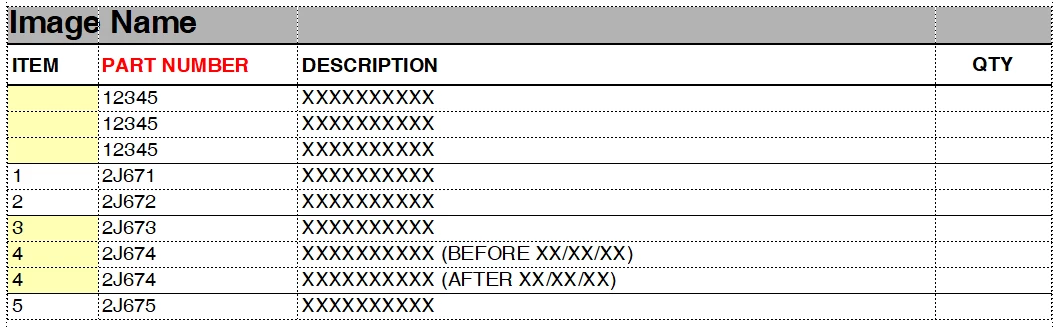
My current Manual Template has a Parts Table that you Insert, but each time you insert it you have to copy and paste the second header row with "ITEM, PART NUMBER, DESCRIPTION, QTY.". I have a script called "Table Ruling" with denifies the second row of the header and if the second header row has "part" in the text - it sets the proper rulings. (ie. thin line after every second number). If the first colum ("ITEM") is blank it will remove the lines between the (what we call the) parent numbers.


I went to format the second row with "Paragraph Formats" and it broke the script code, since it no longer has the "Part" as plain text. Is there a way to change the current script to look for a "Paragraph Format = zCellPN" instead.

Suspected code I need to change:

                                if(dude.indexOf("PART") !== -1) //Checks for a Parts Table.
 

    This topic has been closed for replies.
    Correct answer jtwork

    Fixed.... replaced all "blarg" block of code with 

    if (cell.FirstPgf.Name === "zCellPN")

    Thank you

    2 replies

    frameexpert
    Community Expert
    Community Expert
    October 15, 2021

    If you have a Cell object, you can do something like this:

    if (cell.FirstPgf.Name === "zCellPN") {
        // Do what you need to do here.
        // ...
    }
    jtworkAuthor
    Inspiring
    October 19, 2021

    I've almost got it....


    { 
                            topRowCell = row.FirstCellInRow;
                            cell = topRowCell;
                            cell = cell.NextCellInRow;
                            if(cell.ObjectValid())
                            {
                                    blarg = cell.GetText(Constants.FTI_String);
                                    dude = ""
                                    if(blarg.len > 0)
                                    {
                                            dude = blarg[0].sdata;
                                    }
                                    if(dude.indexOf("PART") !== -1) //Checks for a Parts Table.
                                    {


    I took out the "cell=cell.CellBelowInCol;" and it worked to identify the new table with just one header row.

    Now I need to match "blarg = cell.GetText(Constants.FTI_String);" with
             "if(dude.indexOf("PART") !== -1) //Checks for a Parts"

    What is the code "blarg = cell.______(Constants.______); that would match your "

    if (cell.FirstPgf.Name === "zCellPN")

     Thank you for your help.

    jtworkAuthorCorrect answer
    Inspiring
    October 19, 2021

    Fixed.... replaced all "blarg" block of code with 

    if (cell.FirstPgf.Name === "zCellPN")

    Thank you

    jtworkAuthor
    Inspiring
    October 15, 2021