
Inspiring
February 5, 2013
Answered

colored row separators

  • February 5, 2013
  • 3 replies
  • 1191 views

I need to build a template with row separators that are blue. I can do this in the table Custom Ruling and Shading dialog for each individual table, but can't figure out how to get this property into the template for all tables. Is it even possible?

FM10 [TCS3]

Win 7

Thanks for any help!
This topic has been closed for replies.
Correct answer Arnis Gubins

You need to create a ruling style that uses the blue colour first, then you can set that as the default ruling style in your Table Designer.

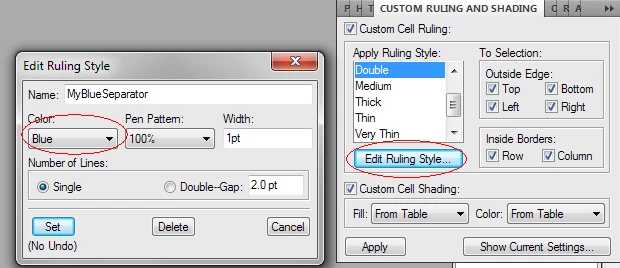
Using the Table > Formats... > Custom Ruling & Shading option, click on the Edit Ruling Style button to create a new style.

In the above example, I created a MyBlueSeparator ruling style. Now, in the Table Designer, I can then use this new style to create blue row separators:

3 replies

LinSims
Community Expert
Community Expert
February 17, 2021

You're right, there is no separate Ruling Styles Designer/Catalog, probably because these are specific to tables and aren't used elsewhere. 


Ruling and shading in tables is one of the few things that Word does better than FrameMaker. For example, Word provides 24 different choices for line styles, including varying patterns of dashed lines and anywhere from 1 to 3 lines of multiple widths. FrameMaker has 5 line styles, and while you can add others, they're all going to be solid lines and can be either 1 line or 2 lines of the same width.


Granted, this isn't a big issue and I rarely miss the variety that Word offers, but sometimes it would be nice to have the options.

Barb Binder
Community Expert
Community Expert
February 17, 2021

The only place to edit rules is in Custom Ruling and Shading. After editing the list and clicking Set, you are done. The No Undo simply means that Fm will remove the undo history after you set it, so you can't use undo if you immediately want to backtrack. However, you can alway go back and and re-edit the rule.


This is a limitation of FrameMaker's undo feature, I just teach my students to be aware of it and not to worry about it. For years, we only had one undo so it has never bothered me personally. I learned how to fix things by going back and changing them.


~Barb

~Barb at Rocky Mountain Training
Arnis Gubins
Arnis GubinsCorrect answer
Inspiring
February 5, 2013

You need to create a ruling style that uses the blue colour first, then you can set that as the default ruling style in your Table Designer.

Using the Table > Formats... > Custom Ruling & Shading option, click on the Edit Ruling Style button to create a new style.

In the above example, I created a MyBlueSeparator ruling style. Now, in the Table Designer, I can then use this new style to create blue row separators:

bearninaAuthor
Inspiring
February 6, 2013

Thank you! I didn't realize that I needed to save my custom settings with a style name.