
Inspiring
January 29, 2020
Question

Colors Are Different on Two Different Graphics

  • January 29, 2020
  • 2 replies
  • 1251 views

This one is really stumping me. 


The same image appears on two different Framemaker Documents. However, one appears grey (which is correct) and the other, black (incorrect). 
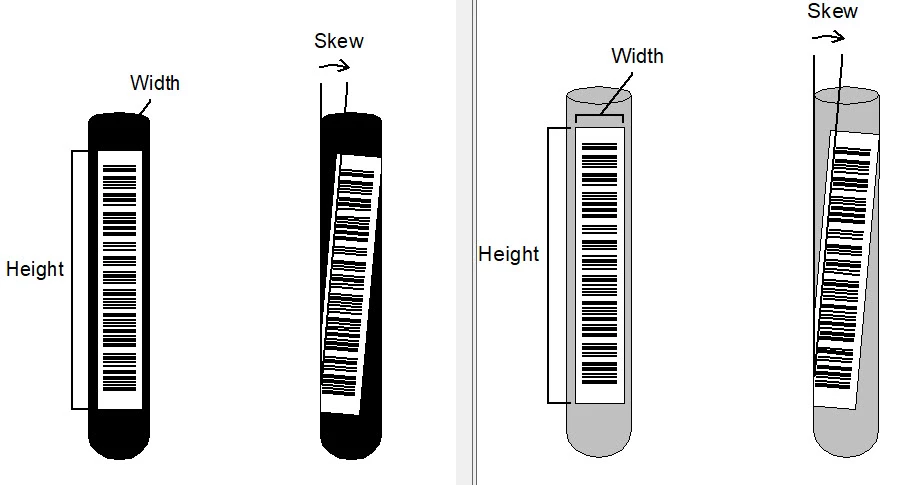
I cannot find the source file for these, so it's not as simple as importing the image. 

I have tried to adjust color in the Anchored frame and Object properties. They are the same. For Object Properties, I even right-clicked and selected "Object properties" for both. They are exactly the same. 

I tried the line fill adjustments in the Object properties toolbar. They are exactly the same. 

I tried view\color\definitions. They are exactly the same. 


Any thoughts? I know I'm doing something wrong (or not performing the right action). Thanks!

This topic has been closed for replies.

2 replies

Matt-Tech Comm Tools
Community Expert
Community Expert
January 30, 2020

Building on what Bob suggests, can you copy the preferred image and paste into the other doc?

-Matt Sullivan, FrameMaker Course Creator, Author, Trainer, Consultant
Inspiring
January 30, 2020

Hey Matt


Yes, I tried that as well...it still copies in as a black image, and not grey.

Matt-Tech Comm Tools
Community Expert
Community Expert
January 30, 2020

Can you produce a PDF of the doc with the gray image?


If so, crop the PDF and reimport, perhaps into both locations by reference.

-Matt Sullivan, FrameMaker Course Creator, Author, Trainer, Consultant
Bob_Niland
Community Expert
Community Expert
January 30, 2020

Inability to find the source suggests that these are not imported by reference, but rather by copy-into-document. If so, that means they could actually be different images (this is one of the reasons why import-by-reference is preferred).


What does Object Properties report for "Facets"?

Inspiring
January 30, 2020

Hey Bob


Strangely, there is literally no information when I select object properties - including the indication that it was pasted in. It's very odd.

Bob_Niland
Community Expert
Community Expert
January 30, 2020

This sounds like it might be Frame vector art, and using named (custom) colors for which the Color Catalog definition varies between the two docs.