
MattiasC
Participant
February 21, 2017
Question

Compare documents from the command line

  • February 21, 2017
  • 1 reply
  • 481 views

I would like to setup automatic comparison between documents in TortoiseSVN, but I would need some way to do it from the command line.

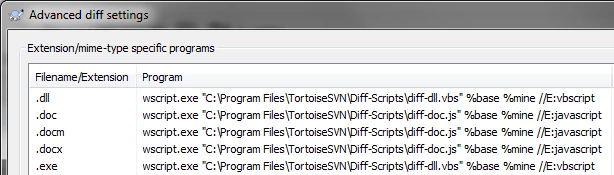
The TortoiseSVN settings window looks like this for other file types and I would need some way to specify to document paths and file to open them with. Does the FrameMaker.exe provide any command line parameters?
This topic has been closed for replies.

1 reply

Legend
February 21, 2017

It might make sense to use MIF instead of FM, as FM is a binary format and MIF is plain text.

In addition to that FrameMaker has a File Compare utility (File > Utilities > Compare Documents), which might be interesting for you to have a look at.

MattiasC
MattiasCAuthor
Participant
February 21, 2017

Thank you for the reply Stefan.

I just found out about MIF while googling for solutions and it looks like a nice file format. I will take some time to learn a bit more about it and see if we can save a few of our documents in it for testing purposes.

I do know about the menu item, but that means that I have to manually check out the old revision into a folder, open my working copy and the older revision and then select "File > Utilities > Compare Documents". It would be very handy if there was a command line interface like this:

Framemaker.exe /Compare %file1% %file%

which would open the files and execute the compare document function automatically.