
Cagataytech
Known Participant
March 18, 2021
Answered

Condition Tags on Table cells cause the condition checker pattern to be created on the pdf output

  • March 18, 2021
  • 1 reply
  • 378 views

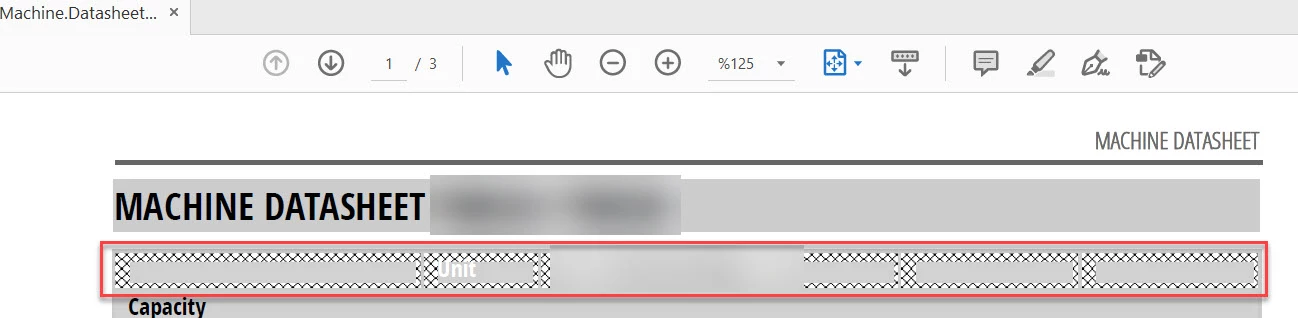
I have defined many conditional tags on table title cells. I wasn't checking my pdf outputs because I'm still continuing on my documentation process but I recently had to print out one of the tables for some datasheet verification job. I did realize that table cells containing conditional tags are being converted to pdf with the visual checker patterns which do represent these tags.


Is this some setting that I'm skipping at the PDF creation or is the practice of conditional tags in table cells something that I have to steer away from?


The conditional tags on FM

 

The pdf output of the same table
This topic has been closed for replies.
Correct answer Winfried Reng

When you apply a condition to a table row or column, it will have this thick frame to show that the condition is applied. See also in the user manual:

https://help.adobe.com/en_US/framemaker/using/index.html#t=using-framemaker%2Fuser-guide%2Ffrm_single_sourcing-conditional-text.html&rhsearch=Applying%20conditional%20tags%20to%20tables&rhhlterm=condition&rhsyns=%20&ux=search

When you want to hide this condition indicator, go to the Show/Hide Conditional Text panel and deactivate Show Condition Indicators.

You cannot show this indicator for text, but not for tables or vice versa.

1 reply

Winfried RengCommunity ExpertCorrect answer
Community Expert
March 18, 2021

When you apply a condition to a table row or column, it will have this thick frame to show that the condition is applied. See also in the user manual:

https://help.adobe.com/en_US/framemaker/using/index.html#t=using-framemaker%2Fuser-guide%2Ffrm_single_sourcing-conditional-text.html&rhsearch=Applying%20conditional%20tags%20to%20tables&rhhlterm=condition&rhsyns=%20&ux=search

When you want to hide this condition indicator, go to the Show/Hide Conditional Text panel and deactivate Show Condition Indicators.

You cannot show this indicator for text, but not for tables or vice versa.

Cagataytech
Known Participant
March 18, 2021

Nice, many thanks. I'm learning something new from each new post.