
Inspiring
February 22, 2018
Answered

Condition Tags - where used

  • February 22, 2018
  • 5 replies
  • 843 views

Hello,

I am looking at a file (.fm) and I see that there are Condition Tags within.  The names of these tags however, lead me to believe they were carried over from a different book and are irrelevant to the book I am working on.  Now, I can delete all of these tags, but would like to first see if they are being used.

Is there some way to do this?

Many thanks.
    This topic has been closed for replies.
    Correct answer RBKearnsJr

    Answered my own question (from help.adobe.com):

    How to check if a tag is used in a document

    Before you delete a conditional tag, you can check if the tag is currently applied to text.

    To check if a tag is applied to text in the document:

    1)Select the tag in the Conditional Tags pod.

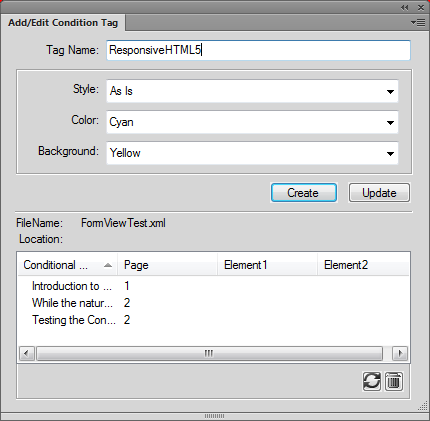
    2)Click Edit to display the Add/Edit Condition Tag dialog.

    List of locations in the document for the selected conditional tag

    frm_tag_list_ct.png  

    3)To go to the location in the document where the tag is applied, double-click on the Conditional Text in the Location list.

    5 replies

    Inspiring
    March 8, 2018

    OK - sigh

    Now I have v2017 and the solution I found before may still apply, but I cannot navigate to the location the same way.

    This came about because I now need to remove a Condition tag from every file in the book.  I would prefer not to have to go into each file and do it as I have over 50 files with this tag.

    Any advice - much appreciated as usual

    Matt-Tech Comm Tools
    Community Expert
    Community Expert
    March 8, 2018

    Check out Rick Quatro's Find Change Formats Batch script. It's a painless way to find, change, and remove things from catalogs, including conditions.

    It will solve your problem in about 15 minutes.

    -Matt

    -Matt Sullivan, FrameMaker Course Creator, Author, Trainer, Consultant
    Barb Binder
    Community Expert
    Community Expert
    February 22, 2018

    That's great, RBKearnsJr. I see this in class all the time... by the time a student has thought through how to ask a question, they have simultaneously figured out where to go to get the answer.

    ~Barb

    ~Barb at Rocky Mountain Training
    Inspiring
    February 22, 2018

    I'm usually multi-tasking so I just throw out a question or two.

    Today, not so busy.  Google led me to the location.

    Barb Binder
    Community Expert
    Community Expert
    February 22, 2018

    How did we ever live without The Google?

    ~Barb

    ~Barb at Rocky Mountain Training
    Barb Binder
    Community Expert
    Community Expert
    February 22, 2018

    Hi RBKearnsJr,

    When you delete any condition tag, FrameMaker will alert you that deleting the tag may impact the document. But if a tag is in use, you will get a second alert stating that some text uses this tag:

    If you are still concerned, you can always redefine a tag style/color to something incredibly bright, show that tag and manually scan the document for it. Find works here as well by setting Find to Conditional Text.

    ~Barb

    ~Barb at Rocky Mountain Training
    Matt-Tech Comm Tools
    Community Expert
    Community Expert
    February 22, 2018

    Yes, use the Find/Change to search for instances of the tag

    -Matt Sullivan, FrameMaker Course Creator, Author, Trainer, Consultant
    RBKearnsJrAuthorCorrect answer
    Inspiring
    February 22, 2018

    Answered my own question (from help.adobe.com):

    How to check if a tag is used in a document

    Before you delete a conditional tag, you can check if the tag is currently applied to text.

    To check if a tag is applied to text in the document:

    1)Select the tag in the Conditional Tags pod.

    2)Click Edit to display the Add/Edit Condition Tag dialog.

    List of locations in the document for the selected conditional tag

    frm_tag_list_ct.png  

    3)To go to the location in the document where the tag is applied, double-click on the Conditional Text in the Location list.