
Inspiring
December 5, 2011
Answered

Conditional cross-references become partially unconditionalized when FrameMaker updates them

  • December 5, 2011
  • 2 replies
  • 2393 views

Hi all,

I have a cross-reference format of "<x-refs><$paratext><Default ¶ Font> on page\ <$paranumonly[h0#]>\+<$pagenum>", where <x-refs> refers to a tag in my Character Tag library, and <h0#> refers to a tag in my Paragraph Tag library. So an actual x-ref might look like this: "Customizing the Preemptor Descriptions for a Signal on page 3-24"

When these x-refs are tagged as conditional text, I have noticed that sometimes when the x-refs get updated by Frame, PART of the x-ref loses its conditional tag. Specifically, the "<x-refs><$paratext><Default ¶ Font>" part stays conditionalized and the " on page\ <$paranumonly[h0#]>\+<$pagenum>" part becomes unconditionalized. Is there something about my x-ref format that Frame doesn't like?

Thanks in advance!
This topic has been closed for replies.
Correct answer kelly_usa

Thanks Van, that's a good idea, I will try that. I think you are right that it is only happening with xrefs that have more than one condition applied. 

I was able to demonstrate the problem to Adobe tech support and they are looking at my files to try to diagnose. If they come up with a solution, I will post it here for the benefit of future sufferers.

Thanks again!

Kelly


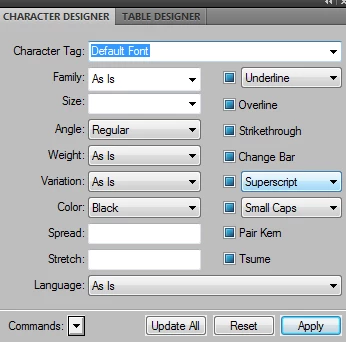
It took a couple weeks, but I finally have a solution. For whatever reason, the <Default ¶ Font> tag is causing the mischief. So I created a new Character Format to replace it, with these settings:

I then changed my x-ref format to:

"<x-refs><$paratext><Default Font> on page\ <$paranumonly[h0#]>\+<$pagenum>"

Things seem to be working fine so far!

(BTW, my statement in my last post that it was "only happening with xrefs that have more than one condition applied" was not true. It was happening regardless of the number of conditions.)

Kelly

2 replies

Inspiring
January 16, 2012

It's a long time ago, so my version numbers might not be correct, but I remember this bug giving us headaches back in version 5.5. We noticed it when the parts of the cross-ref that jumped out of the condition actually got plastered onto the front of the next heading (because those parts became the only visible text in a section that was supposed to be hidden), and from that position they got cascaded into the table of contents! (By "jumped out of its condition" I mean that the entire cross-reference still had the condition applied to it, but Adobe wasn't honouring it that condition for the cross-ref text that appeared after the Default Para Font argument.)

Adobe partially fixed the problem in 5.5.6; that is, it no longer jumped out of its condition, although the colour of the text was still not using the correct conditional colours so the text *looked* as if it had still jumped out of its condition. The situation was very confusing when using conditional text to create multilingual manuals from single-source masters, so in the end I opted for the same solution that you did. I made an alternative character style and used that instead of Default Para Font. Curiously, and thankfully, variables didn't suffer from the same problem.

Once I implemented the workaround in 5.5.6 I didn't follow up on whether or not it ever got fixed properly, colours and all. Looks like they've broken it again in 9.

Bob_Niland
Community Expert
Community Expert
December 5, 2011

Is the CC actually being removed?

When you switch off the condition, is the Xref partially visible?

Have you examined the MIF to see if the tag stops and restarts?

I have seen what appears to be CC loss on Xrefs (condition indicator vanishes), but the Xrefs behave correctly. This may just be a cosmetic bug during edit.

To get the most help, also tell us:

What Frame version (#.#.#)?

What operating system, SP?

32- or 64-bit mode?

kelly_usaAuthor
Inspiring
December 5, 2011

Hi, thanks for your reply! Yes, the xrefs are only partially visible when I turn off the condition. I am using:

Frame 9.0p255

Windows 7 SP1, 64-bit

Tomorrow I will try running a file thru .MIF and see what I can see....