

David Kuhn 5000
Inspiring
October 15, 2023
Question

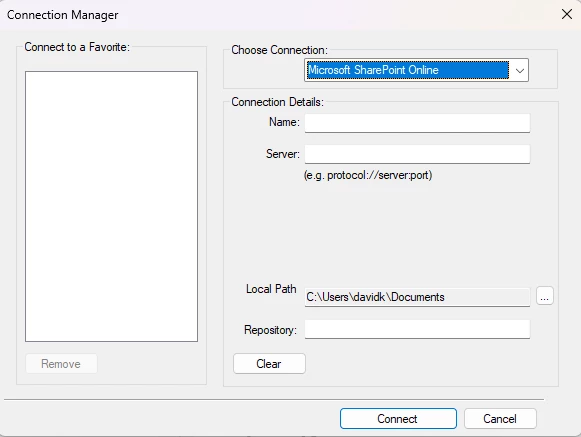
Connection Manager Details

  • October 15, 2023
  • 2 replies
  • 190 views

I was working with IT to investigate a potential security issue with providing the Sharepoint details and paths to files that are required in the Connection Manager. 

When we tested it, IT made a few attempts to enter the details that he thought was required here, but it could not make the connection. 

Can anyone provide more information about what exactly is required here in each field? 

Please do not just repeat the name of the field. Please be as specific as possible. 


    This topic has been closed for replies.

    2 replies

    Matt-Tech Comm Tools
    Community Expert
    Community Expert
    December 15, 2023

    Can you please confirm that you are connecting to SharePoint Online, and not "just" SharePoint?

    In my experience, connecting to SPO is no different than logging into all my other SAAS products.


    -Matt

    -Matt Sullivan, FrameMaker Course Creator, Author, Trainer, Consultant
    Inspiring
    December 12, 2023

    Hi David,
    under "Name:" put the name of the library e.g. Documents, you want to connect to.

    Under "Server:" put the Sharepoint site path e.g "https://blabla.sharepoint.com/sites/YourSite/"

    Under "Repository:" put a name which becomes a folder in your specified location "C:\Users\davidk\Documents" to which the framemaker files will be downloaded when you checkout files from sharepoint.
    Note the I had trouble with FrameMaker 2019 and FrameMaker 2022 to connect to our Sharepoint libraries.
    With update 3 of FM 2022 connecting was again possible.
    Best regards