Known Participant
August 6, 2012
Answered

Connection Manager will not cooperate

  • August 6, 2012
  • 2 replies
  • 1894 views

Although I did finally get SharePoint 2010 to connect to FrameMaker, I'm having a terrible time with the Connection Manager. I cannot seem to re-enter a connection - only specify new ones. When I supply the details for an existing connection and click on Connect, I get this:
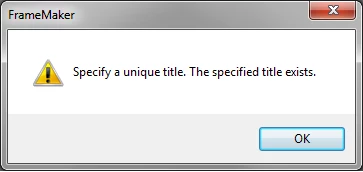
I know it exists! I want to select the titled repository, but Connection Manager apparently thinks its job is only to create new connections. What am I missing here?

Oh, when I open the repository manager, there are no repositories listed there. If I specify a different name in the Connection Manager, that will be listed, but of course that builds a new local path and any files I had checked out in my last session are not present in the new path. This will never do.

How do I open the repository that I've already had open and populated with files?

Edit: I've sort of figured out a workaround - when the Connection Manager comes up, if I Remove the repository listed there, then re-specify its connection parameters, it will finally open. This couldn't possibly be the way it is supposed to work, based on the instructions in the Help file. I'm a little leery of doing things this way - I've already lost some data because of this. Ideas anyone?

This topic has been closed for replies.
Correct answer

The Port and Password in mine are blank also. We're using the default port, so I leave it blank. I have to enter the password each time I want to connect.

A connection to http:/mySharePoint with a blank (default) port is not the same as a connection to http:/mySharePoint with a specified port. It sounds like when you type the Port, the Connection Manager thinks you're asking for a different connection with the same name, so you get the error.

If you can connect by taking special steps, you must be providing the right server and port when you define the connection initially. Are you saying that your Port entry is not saved?

I'd try connecting without specifying a Port. If that doesn't work, try setting up a connection and leaving the Port blank. The documentation shows one, but I didn't need it, and unless there's something special about your SharePoint installation, you probably don't either.

2 replies

September 12, 2012

This viewer doesn't understand the problem.

My Connection Manager has a frame for "Connect to a Favorite."  If I select a Name in it and click "Connect,"  FM connects and opens the Repository Manager.

The entries in this frame were created when I filled in the form on the right (Server, Port, User Name, Password, Name) and clicked "Connect." For each new entry, I had to provide a unique name. Otherwise I would get the error message you reproduced above.

I notice that if I click Clear and then enter the same information I just cleared, with the same name, I also get the error message you reproduced above.

Known Participant
September 12, 2012

When I bring up the connection manager, the connection I wish to use is listed there. I can click it, but the Port and password are not shown in the table on the right. Clicking connect produces a 404 error. If I add the port and password, connection manager wants to create a new connection. As I said above, there is no way to choose an existing connection, only to create new connections.

Correct answer
September 12, 2012

The Port and Password in mine are blank also. We're using the default port, so I leave it blank. I have to enter the password each time I want to connect.

A connection to http:/mySharePoint with a blank (default) port is not the same as a connection to http:/mySharePoint with a specified port. It sounds like when you type the Port, the Connection Manager thinks you're asking for a different connection with the same name, so you get the error.

If you can connect by taking special steps, you must be providing the right server and port when you define the connection initially. Are you saying that your Port entry is not saved?

I'd try connecting without specifying a Port. If that doesn't work, try setting up a connection and leaving the Port blank. The documentation shows one, but I didn't need it, and unless there's something special about your SharePoint installation, you probably don't either.

Known Participant
August 8, 2012

Really? 277 views and no responses?

Someone must know how this thing is supposed to work - the help file sure doesn't provide a clue. Or at least in my setup, the help file indicates one thing when I see something else.

Why do I have to delete the repository and re-enter its info just to attach to it?