

Inspiring
October 18, 2024
Answered

Content not displayed in HTML5 Output

Hi

I have a small book, which comprises two files plus the TOC. When I create the output, HTML5, only the TOC displays correctly, but none of the content is displayed. 


    This topic is closed to new replies. Start a new post to keep the conversation going.
    FrameMaker-dk
    FrameMaker-dkCorrect answer
    Community Expert
    October 18, 2024

    When you set up the sts file, you have an option of for designating which paragraph styles are supposed to break up the publication like this:
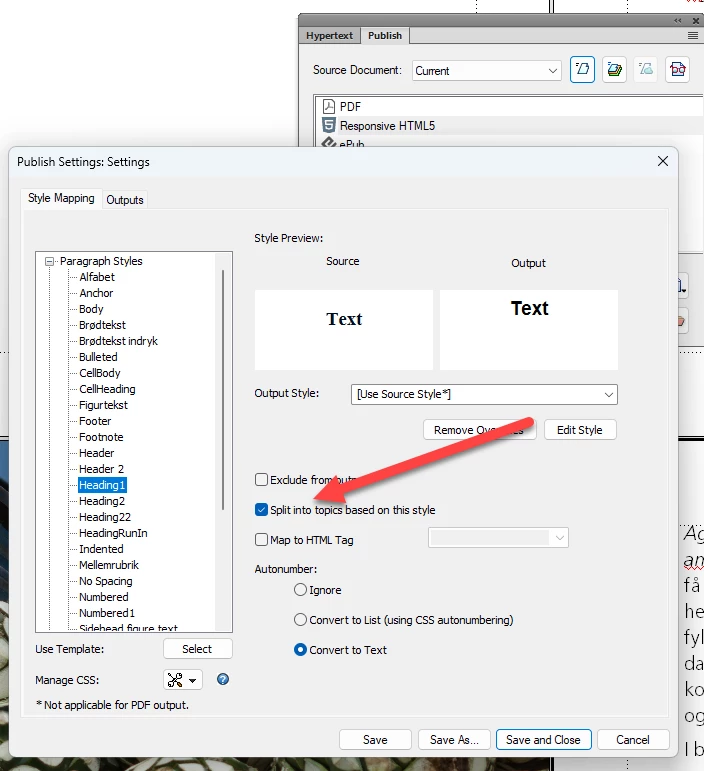
    Have you assigned any header paragraphs for that?

    Initially I believe your issue is one about the naming of the framemaker files. Are you using very long names for the framemaker files or do they include odd characters like /  or \ or ? or... something else? Naming may also be an issue with the folders containing the framemaker files.

    Bjørn Smalbro - FrameMaker.dk

    8 replies

    Inspiring
    October 18, 2024

    Hi
    Thanks, I am now up-to-date, but the HTML5 still isn't displaying my content


    Translate
    Community Expert
    October 18, 2024

    And: What's your FrameMaker version (17.0.x?)

    The export to HTML5 is improved with every update.

    Translate
    Jeff_Coatsworth
    Community Expert
    Community Expert
    October 18, 2024

    What version of FM?

    Translate
    Inspiring
    October 18, 2024

    I'm using 17.0.3

    Translate
    FrameMaker-dk
    Community Expert
    FrameMaker-dkCommunity ExpertCorrect answer
    Community Expert
    October 18, 2024

    When you set up the sts file, you have an option of for designating which paragraph styles are supposed to break up the publication like this:

    Have you assigned any header paragraphs for that?

    Initially I believe your issue is one about the naming of the framemaker files. Are you using very long names for the framemaker files or do they include odd characters like /  or \ or ? or... something else? Naming may also be an issue with the folders containing the framemaker files.

    Translate
    Bjørn Smalbro - FrameMaker.dk
    Inspiring
    October 18, 2024

    Thank you, I have changed the file names and now my content is displaying correctly. 

    Translate
    FrameMaker-dk
    Community Expert
    Community Expert
    October 18, 2024

    Great! Always nice when things work!


    Translate
    Bjørn Smalbro - FrameMaker.dk