Known Participant
November 15, 2013
Question

Conversion Tables: Lists

  • November 15, 2013
  • 1 reply
  • 580 views

I'm having several problems with my lists, both <ul> and <ol>. I'd appreciate any advice I can get.

  1. Any time I have a <p> element inside a <ul> or and <ol>, two things go wrong:

1. The <body> element closes before the <p> element

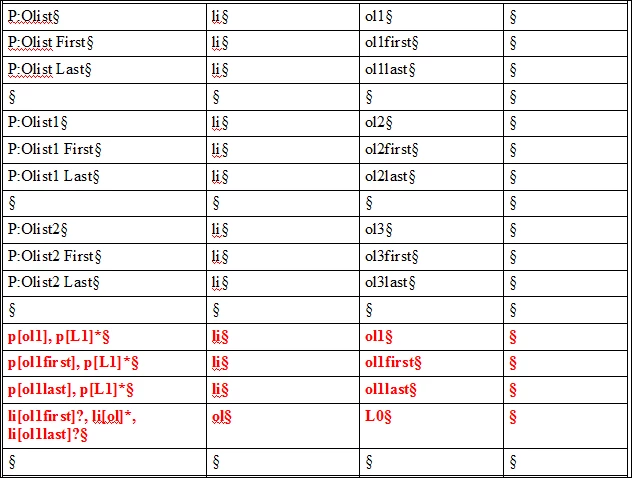
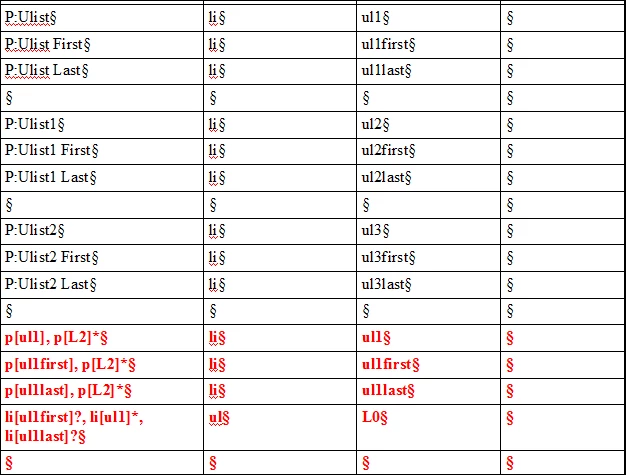
2. The <p> element is at a level 0 indent rather than a level 1 (L0 and L1 in the Qualifier column of the conversion table)

Example:

This:

  • From the menu bar, select Help, and then select About Whatever.

          An information box appears showing xyz.

  •   Select Close to close the box.

Comes out as this:

ol> <li> From the menu bar, select Help, and then select About Whatever. </li> </ol></body>.

<p> An information box appears showing xyz. </p>

<li> Select Close to close the box.</li>

and the "An information box" paragraph is not indented.

Bottom line: I want to be able to have a <p> in a list without breaking the structure. The <p> must be indented so it is shown to be related to the <li>.

2.    Lists in tasks are bulleted, rather than numbered.

Example:

This:

To view login details:

1. Open it.

2. Do it.

3. Close it.

Comes out as this:

<stepsection> To view login details: </stepsection

  • <ol><li>Open it.<li>
  • <li> Do it.</li>
  • <li>Close it.</li></ol>

          Bottom line, I want my procedures/tasks numbered, not bulleted.

Conversion Table Entries for lists:

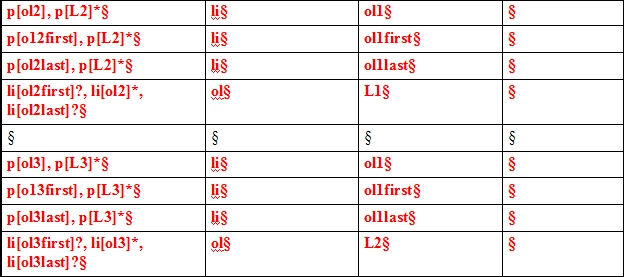
Ordered Lists
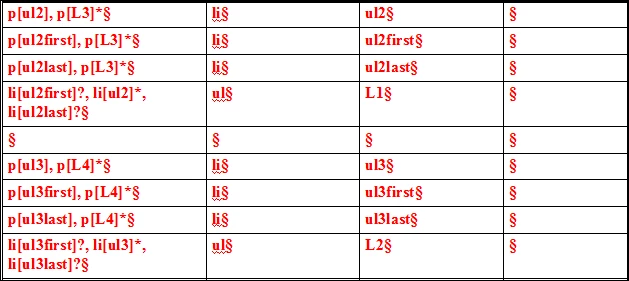
Unordered Lists
Thanks in advance for any help you can provide.

This topic has been closed for replies.

1 reply

Inspiring
November 19, 2013

Marsha,

  1. Formatting (bullets vs. numbers) is controlled by element definitions, usually imported from an EDD. Get the structure right with the conversion table and then worry about formatting.
  2. When a list item can contain multiple paragraphs and sublists, account for all possibilities in one conversion table row. For example, instead of mapping P:Olist to li, you probably want to map P:Olist, (p[L2] | ol[L2] | ul[L2])* to li, so that you derive a single li from an Olist followed by any combination of additional paragraphs and sublists.
  3. While the paragraph formats for the first and last items in a list may differ from that of those in the middle of a list, it is often unnecessary to keep track of those distinctions throughout the conversion table. You will need separate conversion table rows for P:Olist, P:Olist First, and P:Olist Last, but entries in the second and third columns for all three rows can most likely be the same: all three paragraphs create list items. Your EDD can then change the formatting of the first and last item in the list appropriately.

   --Lynne

Known Participant
November 19, 2013

Thanks, Lynne.

My EDD is working properly. I can create these types of lists from scratch. It's just in conversion that it is not working.

I took your advice and changed the conversion table to "account for all possibilities in one conversion table row."

and so on for all list levels, both ol and ul

That now has everything wrapping perfectly:

However, as yoou can see, the bullets and nubers are not correct. When I cheeck the paragraph designer, they are all PreReqOlist (the ordered list format I use for pre-and-post-requisites).

Here's my conversion definition for PreReqUlist:

From what I can see, the definitions do not overlap.

Why are all of my list items now showing as PreReq list items? They are both fine in the EDD as evidenced by the fact that I can create topics from scratch using them; I just can't convert legacy information.

TIA,

Marsha