
Inspiring
June 17, 2024
Answered

Convert existing structure to Table

  • June 17, 2024
  • 3 replies
  • 389 views

FM 17.0.4.628.


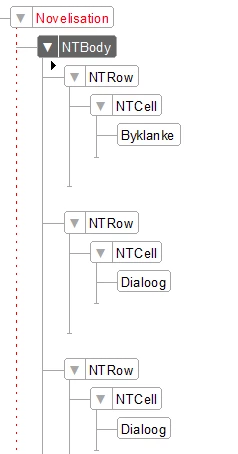
I have a MS Word document that I'm converting to a structured FM document (via a convervion table). The conversion works as expected with the text converted to the correct Elements/Structure, e.g.: 
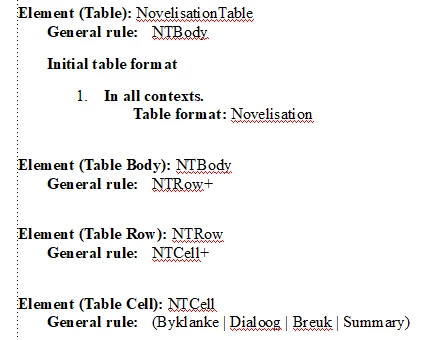
In my EDD,  I have Novelisation as a Table Element that matches the structure above:
 

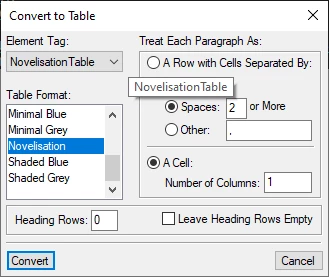
However, the original text is not in a table. When I use the Convert to Text function to convert the Novelisation element into a table with the following settings:
I get this result:
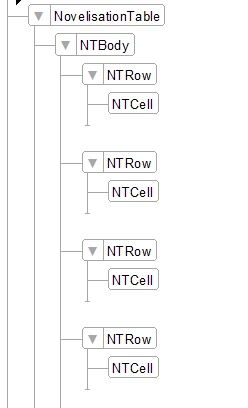
All the elements inside the original NTCell Elements have been unwrapped and are now just NTCell elements.


Is this by design, am I missing something or am I doing something wrong?

    This topic has been closed for replies.
    Correct answer QuintinSeegers_Personal

    Hi @Matt-Tech Comm Tools ,


    Yes, I do have your workbook. Admittedly, I didn't think of the Initial Table Structure. I was trying to convert it to a single-column table.


    However, I have since decided to go another route. Instead of putting the content into a table (because I was going to add a second and third column to the table once converted), I opted to go with a 3-column page layout (flow A, B and C, respectively) instead because I need to add content into the 2nd and 3rd column that would have spanned multiple rows in the table.

    3 replies

    Matt-Tech Comm Tools
    Community Expert
    Community Expert
    June 20, 2024

    But, before you do that...are you looking to convert to a single-column table, as you've set in your conversion dialog?

    -Matt Sullivan, FrameMaker Course Creator, Author, Trainer, Consultant
    QuintinSeegers_PersonalAuthorCorrect answer
    Inspiring
    June 20, 2024

    Hi @Matt-Tech Comm Tools ,


    Yes, I do have your workbook. Admittedly, I didn't think of the Initial Table Structure. I was trying to convert it to a single-column table.


    However, I have since decided to go another route. Instead of putting the content into a table (because I was going to add a second and third column to the table once converted), I opted to go with a 3-column page layout (flow A, B and C, respectively) instead because I need to add content into the 2nd and 3rd column that would have spanned multiple rows in the table.

    Matt-Tech Comm Tools
    Community Expert
    Community Expert
    June 20, 2024

    I think you have my workbook...If so, look up the section on Initial Table Structure.

    -Matt Sullivan, FrameMaker Course Creator, Author, Trainer, Consultant
    Community Expert
    June 18, 2024

    Hi,

    Does your result mean that there aren't any elements in the NTCell elements? Not even paragraphs?

    What are your elements Byklanke, Dialoog, etc.? Are these special text elements?

    Best regards, Winfried

    Inspiring
    June 18, 2024

    @Winfried Reng ,

    The Byklanke/Dialoor elements are just normal paragraph-type (<text>) elements. I end up with text directly in the NTCell element, instead of the original Byklanke/Dialoog elements inside the NTCell element. Like the Byklanke/Dialoog elements are replaced by the NTCell element, instead of being wrapped in the NTCell element.