



Creating a TextLine with character format
Well friends, the story about TextLine needs a new chapter:
Things go really strange with this short script:
// Clone a selected TextLine to check the function
#target framemaker
main ();
function main () {
var j, oDoc = app.ActiveDoc, oFrame, oSelected, oTextLine, sText, oTextLoc, oTR, CM = 1857713, DEGREE = 65536;
oSelected = oDoc.FirstSelectedGraphicInDoc;
oFrame = oSelected.FrameParent;
oTextLine = oDoc.NewTextLine(oFrame);
oTextLoc = new TextLoc (oTextLine, 0);
oDoc.AddText (oTextLoc, "New text");
oTextLine.BasePointX = oSelected.BasePointX; // not changed
oTextLine.BasePointY = oSelected.BasePointY + 1*CM;
oTextLine.StyleTag = "fh2-fig-heading2";
oTextLine.Angle = 5 * DEGREE;
oTextLine.Fill = 0; // not used !
oTextLine.Color = oDoc.GetNamedColor("Magenta"); // does not work
} //--- end main
- Source TextLine selected, then script applied:
Resultant 'clone' is an object TextLine, indicated in the status line as O: fh2-fig-heading2*
but using colour ddd-3 (used in table heading cells etc.)
Selected as text it has no style, but size is 128 pt (as used by a specific ¶ format) and font family which can be from fh2-fig-heading2 but also from the specific ¶ format
- Now I select the cloned text (the green one) as text and apply the character format fh2-fig-heading2.
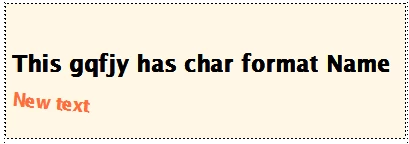
- Now i delete the clone TextLIne (the red one), select the source TextLine again and run the script:
Resultant 'clone' text is an object TextLine as before indicated in status line and text has character format (obviously from the manual action before deletion).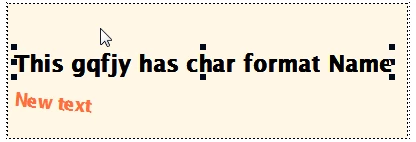
My questions are:
- Wherefrom gets the first created clone TextLine its strange properties?
- How to correctly apply a character format to this type of thingy?
You may say that the cloned object did not get the properties from the source object (the one I select before invoking the script), but trying to replace lines 10 -18 by
oTextLine = CloneTextLine (oDoc, oFrame, oSelected);
oTextLine.BasePointY = oSelected.BasePointY + 1*CM;
and defining the required function as
function CloneTextLine (oDoc, oFrame, oSource) { // --- Clone TextLine object ----------
var oClone, attr
oClone = oDoc.NewTextLine(oFrame);
for (attr in oSource) { // attr = BasePointX, ...
if (oSource.hasOwnProperty(attr)) {
oClone[attr] = oSource[attr];
}
}
return oClone;
} //--- end CloneObject
creates an empty TextLine with Witdh 0 and Height 128pt ... and some additional TextLInes, which remain invisble when selected and centered to have them in the middle of the Anchored Frame - but they can be deleted...


 AdChoices