
Known Participant
July 6, 2020
Question

Creating PDF

  • July 6, 2020
  • 1 reply
  • 226 views

Hi, 

I converted 7.1 .fm file to 2019 version. while im doings save as pdf option im geting error content page see below image.
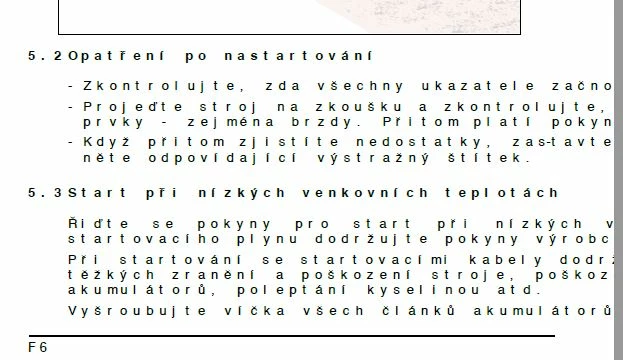
i have no idea why its coming like this.

cheked in pdf set up also 

note: im using framemaker 2019 version 

Any one knows answer please help me out

thanks in advance

This topic has been closed for replies.

1 reply

Community Expert
July 6, 2020

Hi,


Do you have the latest update of FM 2019? The latest version is 15.0.6.956.

Which font do you use for these paragraphs? Does this happen only here or on all pages?

Can you do a MIF wash? This means: Save as MIF, open the MIF in FrameMaker, then save as FM again. This corrects mistakes in the FM file.

When you restart FrameMaker, do you still get this issue?

How do you create the PDF? Via Distiller or with the FrameMaker PDF engine? In the publishing pod select PDF, then click on the icon to the right of Settings.sts and select Edit. There is the option Use Acrobat Distiller for PDF generation. Can you create your PDF with and without this option?


Best regards


Winfried

Known Participant
July 7, 2020

Hi,

Im using FM version of 15.0.0.393. some chapters only im getting error like above i mentioned.
I created .ps file also but while distilling the .ps file
im getting error like heveltica CE can not be embedded due to license
restriction( for creating .ps file i choosed adobe pdf as a printer).
Im using hevetica and arial family font for these paragraphs.

one more issue also there, after creating pdf via distilling the .ps file

i tried to copy the content some other application like note pad or word im getting some blocks only instead of fonts. 

so i cant able search the content see the blow image

 whatever coming as blocks that is visible in pdf clearly