
Inspiring
February 27, 2019
Answered

Cross-Reference Between Books

  • February 27, 2019
  • 3 replies
  • 1437 views

I'm using Framemaker 2019 unstructured. My end publications are .pdf's, located in separate folders, then posted to my customer facing website.

I've been asked to create a link from one book to another.

Example:

Book 1, Chapter 27, page 4 - click on a cross-reference (I set specific words) to then open Book 2, Chapter 27, page 1

I had both books/chapters open. I created the cross-reference in Book 1, and then use paragraph tags to select the other book's link area.

"Document" refers to Book 2.
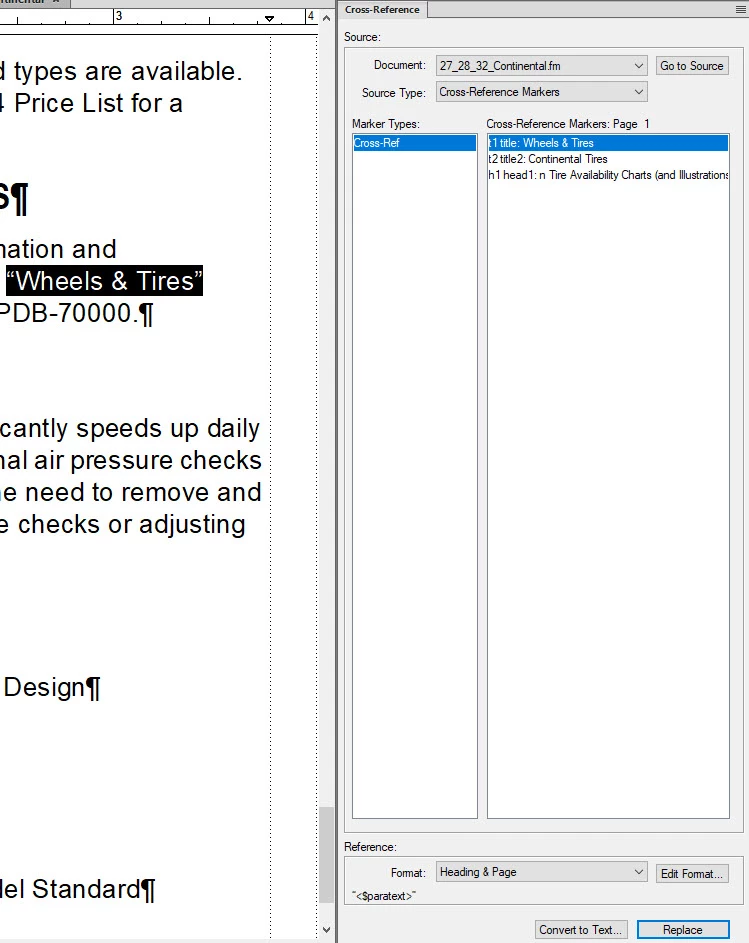
I updated and ran both books and put them on my desktop to test. When I click on the cross-reference link it doesn't do anything except show the "hand pointing" tool when you hover. Is it possible to do what I've been asked? If so, is this the appropriate way to do it AND when they get moved to their web folders, how do I manage the links? Is that a manual update on my part or do they get auto updated when moved?

    This topic has been closed for replies.
    Correct answer Barb Binder

    Hi Katy:

    This may be what you are looking for:

    When you are creating cross-references between books and want those links working in your PDFs, you must have all of the .book files open (but you don't need to have any of the .fm files open) when creating the PDF for any of the books.

    If you want to move the PDFs to other locations, you should also have all of the .book files in a single folder to begin with, otherwise you will always have to have the PDFs in the same relative folder structure for the links to work between books. Note, you simply can't move the book files to a common folder either. You will have to rebuild them or edit the MIF version to point to the correct component files in the appropriate folders.

    Always let FM do the file naming, i.e. never change a PDF name after it's been created. The FM .book file name should the name that you want your PDF to have.

    https://forums.adobe.com/people/Arnis%20Gubins
       Cross-references do not work outside book - Help!

    ~Barb

    3 replies

    Jeff_Coatsworth
    Community Expert
    Community Expert
    November 7, 2019

    Sounds like you didn't keep the relative paths to all docs the same - that would preserve the links inside FM. I get around all this be using a master book-of-books scenario - 1 master book with 63 sub-books inside it.

    Participating Frequently
    November 7, 2019

    This project is being totally rebranded and the previous writer used the old product name in the all the directories, book names, and even file names. So far, I 've only renamed the directories but that broke the cross-book links straightaway. My company doesn't publish the books as HTML, only posts the generated PDFs, so I don't know if it's worth the effort to restore those links. It only makes sense with an eye toward the future but I probably won't be around to see that happen.

    Is there any documentation about creating a master book-of-books? The FrameMaker isn't much help.

    Community Expert
    November 8, 2019

    Hi,


    In the FrameMaker help there is some information:

    https://help.adobe.com/en_US/framemaker/2019/using/using-framemaker-2019/frm_books_bk.html 

    In these sections there are explanations what you can do:
    Books and long documents
    Create books

    Best regards


    Winfried

    Barb Binder
    Community Expert
    Barb BinderCommunity ExpertCorrect answer
    Community Expert
    March 8, 2019

    Hi Katy:

    This may be what you are looking for:

    When you are creating cross-references between books and want those links working in your PDFs, you must have all of the .book files open (but you don't need to have any of the .fm files open) when creating the PDF for any of the books.

    If you want to move the PDFs to other locations, you should also have all of the .book files in a single folder to begin with, otherwise you will always have to have the PDFs in the same relative folder structure for the links to work between books. Note, you simply can't move the book files to a common folder either. You will have to rebuild them or edit the MIF version to point to the correct component files in the appropriate folders.

    Always let FM do the file naming, i.e. never change a PDF name after it's been created. The FM .book file name should the name that you want your PDF to have.

    https://forums.adobe.com/people/Arnis%20Gubins
       Cross-references do not work outside book - Help!

    ~Barb

    ~Barb at Rocky Mountain Training
    Bob_Niland
    Community Expert
    Community Expert
    March 8, 2019

    Barb, assuming the relative-directory tree (source and served must match, or simply be a single common) is addressed, do these links become "deep links" from one PDF to content well inside the other?

    Doing that used to require aftermarket tools. If it now works automagically, when did that come in?

    Barb Binder
    Community Expert
    Community Expert
    March 8, 2019

    Bob—I don't know the answer. Katy posted her question a week ago and no one responded. After she reached out to me directly this morning I:

    a.) responded to push her question back to the top, and

    b.) did a bit of googling and found the post from Arnis that seems to be on the right track.

    I am hopeful that someone who does this regularly will chime in and give her a hand.

    ~Barb

    ~Barb at Rocky Mountain Training
    Barb Binder
    Community Expert
    Community Expert
    March 8, 2019

    Hi Katy:

    It looks like your question was overlooked. Let's see if we can get this figured out.

    Let's start in FrameMaker—open the file with the cross-document cross-reference. Double click it (which opens the Cross-reference dialog box). Click the Go To Source button in the top right corner. Does this open the other document and place your cursor at the cross-reference marker?

    ~Barb

    ~Barb at Rocky Mountain Training