
Participant
October 31, 2023
Answered

Cross Reference Colors

  • October 31, 2023
  • 1 reply
  • 586 views

Hello, I need help to make the font of cross-references blue. I've looked at other posts related to the issue and have attempted the steps but for whatever reason, my cross-references remain black.

1. In the character catalog, I create a new style:
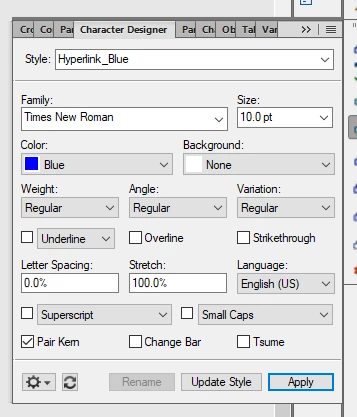
2. In the cross reference pod, I click on the building block labled 'hyperlink_blue' and add it to the cross reference I'm trying to create
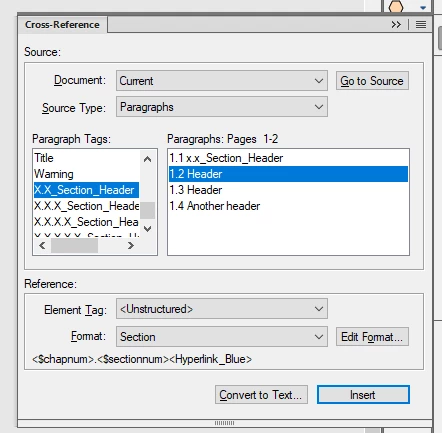
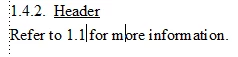
3. When I click on insert, I get the following. The font remains black, not blue
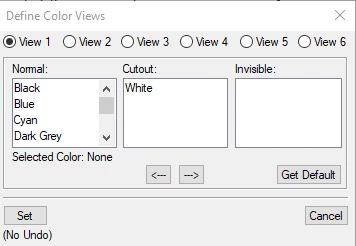
In other posts, some say to go to View>Colors>Views to see if the color blue is hidden. As far as I can tell it's not.
Any help is greatly appreciated. Thank you, 


    This topic has been closed for replies.
    Correct answer Jeff_Coatsworth

    I don't think you're building the Format correctly - shouldn't the character tag go before the bit that you want to change colour? And shouldn't there be a </> "ender" after using it?

    Edit - like:
    <$chapnum>.<$sectionnum><Hyperlink_Blue><$paratext></>

    1 reply

    Jeff_Coatsworth
    Community Expert
    Jeff_CoatsworthCommunity ExpertCorrect answer
    Community Expert
    October 31, 2023

    I don't think you're building the Format correctly - shouldn't the character tag go before the bit that you want to change colour? And shouldn't there be a </> "ender" after using it?

    Edit - like:
    <$chapnum>.<$sectionnum><Hyperlink_Blue><$paratext></>

    Participant
    October 31, 2023

    Thank you, Jeff! Adding '<$paratext></> did the trick! 

    Jeff_Coatsworth
    Community Expert
    Community Expert
    October 31, 2023

    Cool - had to crack open my old Publishing Fundaments: Unstructured FM 11 manual for that one [shout out to @Matt-Tech Comm Tools ] - (I don't really deal with any link formatting inside my FM files - only in the HTML5 that I create).