
Participating Frequently
July 8, 2014
Answered

Cross-Reference creation

  • July 8, 2014
  • 1 reply
  • 1535 views

Hello to all!

I am new to this amazing world of Extendscript but I have been using Framemaker since version 5.5.

I am working on a kind of cross-reference manager and it works really nice. I can list all cross-references at book or document level, select the cross-reference to be shown in the current document and so on. I am using non-structured FM.

The problem I am facing is the creation of cross-reference itself.I know how to create a Cross-Ref Marker for the Xref, but I don´t know how to insert the Xref into the content. I tried with NewAnchoredFormattedObject function with objType, format and textLoc parameters. Also there´s the XRefSrcText property (string containg unique ID:pgf_tag:text).

The question is: Should I use the same string (the content of XRefSrcText) as text for the Cross-Ref type Marker? Or just the pgf text that contains the Cross-Ref?

I have found several examples using Framescript but I am unable to replicate the code using ES.

Thanks for reading me. I will appreciate any help on this.

Regards
This topic has been closed for replies.
Correct answer 4everJang

Hi again Jang:

I have been trying to create the XREF following your suggestions:

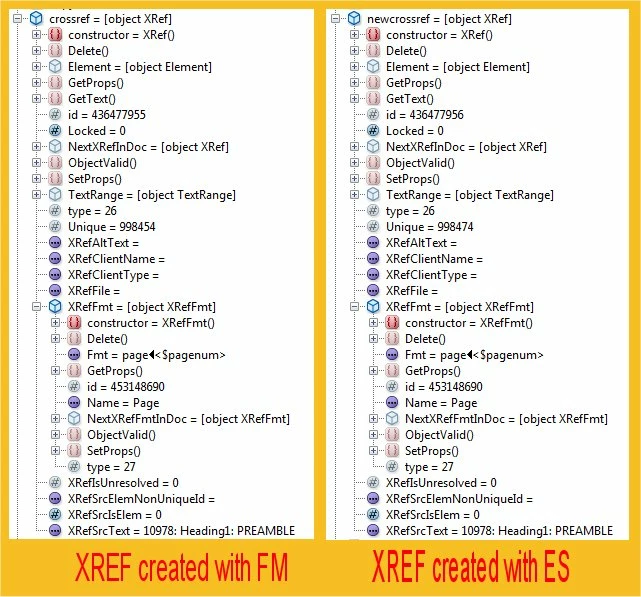
  1. First I created a XREF using the FM procedure. Then I created a code to get the info from Data Browser in the ESTK.
  2. Then I created a XREF using my own code: FM recognizes the XREF (as you can see on the right image) but I cannot get any cross-ref on the content.

Here is the code for the Cross-ref marker target creation:

var doc = app.ActiveDoc;

var flow = doc.MainFlowInDoc;

var pgf = doc.TextSelection.beg.obj

var tLoc, marker, markerType;

tLoc = new TextLoc(pgf, 0);

marker = doc.NewAnchoredObject(Constants.FO_Marker, tLoc);

markerType = doc.GetNamedObject(Constants.FO_MarkerType, "Cross-Ref");

marker.MarkerTypeId = markerType;

marker.MarkerText = "10978: Heading1: PREAMBLE";

Here is the code I am using to create the XREF:

var doc = app.ActiveDoc;

var flow = doc.MainFlowInDoc;

var pgf = doc.TextSelection.beg.obj;

var oTLoc1=new TextLoc (pgf, 0);

var format="Page";

var newcrossref=doc.NewAnchoredFormattedXRef(format, oTLoc1);

newcrossref.XRefFmt.Name=format;

newcrossref.XRefSrcText= "10978: Heading1: PREAMBLE";

I have tried with tons of modifications but without success.

I hope you can help me!

Regards


Hi,

Your code does work, but you forgot to update the cross-references in your document. To do this in the code, add the following line to the end of the XRef insertion code snippet:

doc.UpdateXRef ( doc, newcrossref );

Ciao

Jang

1 reply

4everJang
Legend
July 8, 2014

Use the NewAnchoredFormattedXRef method instead. It works in my script (which creates XRefs for structured FM documents).

SFRIPAuthor
Participating Frequently
July 8, 2014

Hi Jang:

First of all let me thank you for all your documentation regarding ES and Framescript, I have learn a lot with all your tips.

How can I connect or link the Cross-Ref Marker to the Xref? Using the XRefSrcText property perhaps? And also, do I need to use the string with unique ID:pgf_tag:text or just the pgf text that contains the marker.

May I ask you to publish the code for this method?

Thanks

4everJang
Legend
July 8, 2014

Not right now. The code I have is for structured FM documents and would need some changes to make it work for unstructured documents, and I am on holiday in the Dutch Carribean. Possibly next week, if I remember to do it. There are a couple of things you need to figure out about the XRefs in FM. If you cannot wait until next week, use this method to learn about XRefs:

1. Create an XRef using FM's own method

2. Select the XRef in your document

3. Create a script that allows you to investigate the oDoc.TextSelection that contains the XRef marker - use the Data Browser in the ESTK for this.

4. Make small changes to the XRef marker from your test script and see what happens to the XRef in FM

Good luck

Jang