FunWrite
Known Participant
December 1, 2015
Answered

Cross-Reference font Issues

  • December 1, 2015
  • 1 reply
  • 2168 views

I'm cross-referencing headings in a table. Everytime I cross-reference, the font changes to a different font (Times Roman). Fonts in the table cells is a 9 pt Georgia font and the heading font is 16 pt Source Sans Pro. The xref format is <Blue><paratext>. Does anybody know what's causing the font to change when cross-referenced?

Really need help!

    This topic has been closed for replies.
    Correct answer Arnis Gubins

    I have a cross-reference to a cell and formatting of the xref text does not match my expectations of how it should appear. The font should be Georgia in the cells and the size should be 9 pt. I was able to replace the font as I explained earlier but the size does not change when I apply the xref. Why does the xref text change?

    Here's my example.
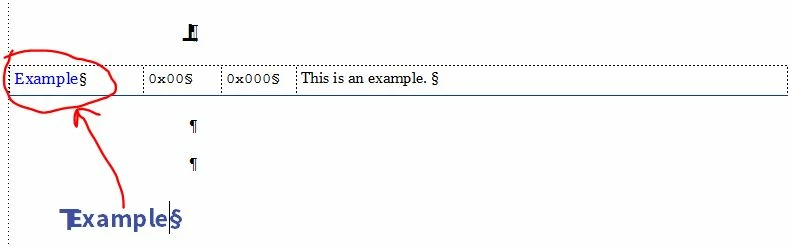

    Your x-ref format is to blame. The <Blue> character tag has more attributes set than you want. If you want the "Blue" character tag to apply just a blue coloujr and do nothing else, then you need to examine what is being applied.

    1. Make a selection outside of the text frame, i.e. just click somewhere where there is no text.

    2. Bring up the Character designer and scroll to the Blue character tag.

    3. Is it showing any other attributes besides Blue?

    4. If so, do Shift+F8 to reset all features to "AsIs" and then select just the colour.

    5. Do an Update All to make this a global change to the character tag.

    Now whenever the <Blue> character tag is used, it should apply just a blue colour and leave the rest of the text as the same as the surrounding paratext.

    Note: what is the "purpose" of the <Blue> paratag? You would be better off using semantic naming (i.e. functional naming, rather than attribute-based naming) in the long term when it comes to document maintenance.


    1 reply

    Bob_Niland
    Community Expert
    Community Expert
    December 1, 2015

    Sounds like a Character Format is applied at the target text.

    Remove it by selecting it, and applying
    [ƒ] Default ¶ Font

    Edit > Update References

    FunWrite
    FunWriteAuthor
    Known Participant
    December 1, 2015

    Applied Default Font to all text that is xreferenced, Edit > Update References and goes back to the Times New Roman font. So I pulled up the Font Pod and saw Times New Roman as one of the fonts listed in my chapter. Double clicked on the Times font and replaced it with the font I wanted. It changed it to the desired font but not the size. The cells that do not have the xref have the correct font size. Only when the xref is applied to the text in the cells of the table, the font properties change.

    Is this an issue in FrameMaker 12?

    Arnis Gubins
    Inspiring
    December 1, 2015

    It's still not clear if:

    1. you are creating a cross-reference to the cells and then the formatting of the content within the cells changes (which shouldn't happen and doesn't in all of my versions of FM12).

    Or,

    2. you have a cross-reference to a cell and the formatting of that cross-reference in your text doesn't match your expectations of how it should appear.

    Is this an example of what you are trying to do?
