ashrae-editor
Known Participant
Aug 9, 2016 3:59 PM UTC
Answered

Cross-References in PDF Output from Framemaker: How to Center Pages?

I believe I understand well-enough how cross-references work in Framemaker, but one thing that bothers me is how, when generating a PDF from Framemaker and clicking on a cross-reference, the resulting page view locates the cross-reference marker at the very top of a page.

This is very inconvenient and confusing when, say, cross-referencing a figure caption that appears at the bottom of a page. The resulting page view when following such a cross-reference in a PDF centers the text of the _following_ page, with the text of the figure caption barely visible at the top of the page.

My question: Is there a way to construct cross-references such that that the resulting page view, when clicking in a PDF, is centered on the page on which the cross-referenced material appears?

Thanks so much.

JMW

    This topic is closed to new replies. Start a new post to keep the conversation going.
    Barb Binder
    Barb BinderCorrect answer
    Community Expert
    Aug 9, 2016 6:49 PM UTC

    Not that I'm aware of in FrameMaker.

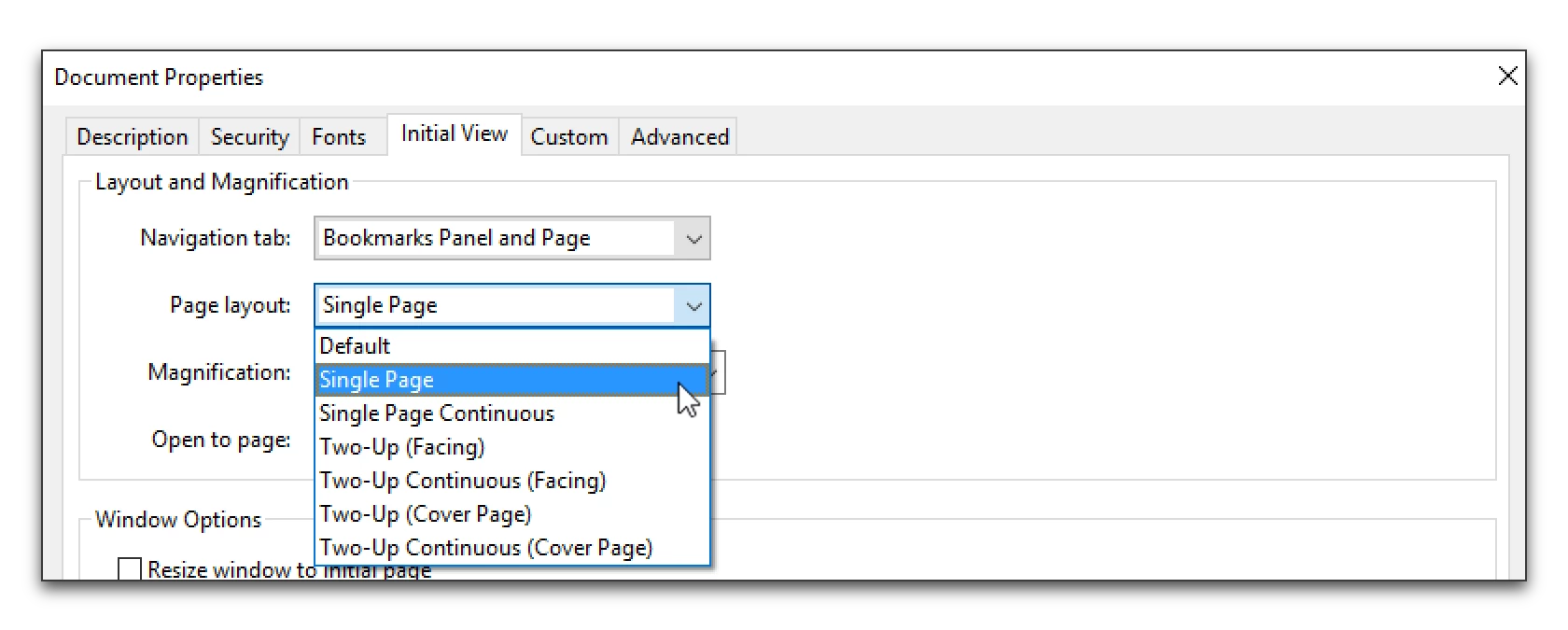
    But in Acrobat, set the Initial View to Single Page instead of Continuous.

    File > Properties > Initial View.

    Two Up (Facing) and Two Up (Cover Page) would also work.

    ~Barb at Rocky Mountain Training

    7 replies

    Barb Binder
    Community Expert
    Barb BinderCommunity ExpertCorrect answer
    Community Expert
    Aug 9, 2016 6:49 PM UTC

    Not that I'm aware of in FrameMaker.

    But in Acrobat, set the Initial View to Single Page instead of Continuous.

    File > Properties > Initial View.

    Two Up (Facing) and Two Up (Cover Page) would also work.

    Translate
    ~Barb at Rocky Mountain Training
    ashrae-editor
    Known Participant
    Aug 9, 2016 7:24 PM UTC

    Excellent! I thought there might be an Acrobat setting, but I wasn't sure. Thanks, BB.

    Translate
    Jeff_Coatsworth
    Community Expert
    Community Expert
    Aug 9, 2016 8:04 PM UTC

    IIRC – that’s a user-set setting – you don’t have any control over it from the production side

    Translate