
Inspiring
April 6, 2010
Question

Database and Framemaker
  • April 6, 2010
  • 4 replies
  • 1431 views

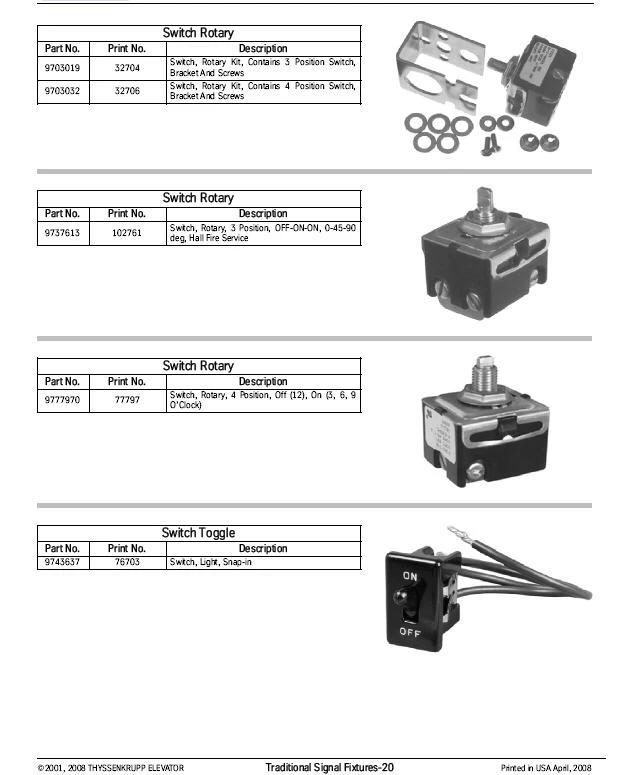
Would someone point me in the right direction on how to produce a manual with the following page style (or something like it) using Framemaker 9 and Microsoft Access? Above is an example of a page in our parts manual. We are currently using Interleaf and have been migrating to Framemaker 9 a little at a time. For our Parts Manual we pull all the information from Microsoft Access and the pictures from another folder. Is there something that we can use to learn how to do this in FrameMaker?

Thanks,

ls

    This topic has been closed for replies.

    4 replies

    lsk2002Author
    Inspiring
    April 7, 2010

    Thank you all for posting some answers. We are going to look into them and see what we can do. If anyone else has any info, please leave more comments.

    Thanks a bunch!

    ls

    April 7, 2010

    If you haven't done so yet, you'll find other threads with more information by searching the FrameMaker forum for the term "database publishing".

    btw, There's a new search button (located on the top right side of the main FrameMaker General page) that restricts the search to the FM forums, making such a search much, much more focused.

    Sheila

    Michael_Müller-Hillebrand
    Legend
    April 6, 2010

    Is,

    I would use FrameScript programming to solve the task, and I have done that before. Using FrameScript you can use SQL statements with the ODBC driver to retrieve data from your MS Access database, you don’t even need Access on the FrameMaker machine. I assume the database records contain some information about image paths.

    If you are looking for a FrameScript contractor, you might want to join

    http://tech.groups.yahoo.com/group/framescript-users/

    and ask for support or contacts.

    - Michael Müller-Hillebrand

    Inspiring
    April 6, 2010

    Setting up the layout is easy enough. Use a 2-column master page. Put the

    table in the first paragraph. Put the graphic in the second paragraph. Then

    create a paragraph format that is set to "Across All Columns" and uses

    either "Frame Above Pgf" or "Frame Below Pgf" to insert the line between

    items. Once you assign this format to the third paragraph, the first two

    paragraphs will jump to a side-by-side position, instead of a

    one-after-the-other position.

    I can't tell you anything about integrating a database, though-- other than

    that there are third-party programs that are commonly mentioned for it, such

    as PatternStream, Miramo, and CatBase.

    April 6, 2010

    Although this refers to an older FM version, most of the concepts in  this Adobe whitepaper are still valid:

    http://help.adobe.com/en_US/FrameMaker/8.0/db_publishing.pdf